From Generic Chat To Repeatable Document Workflows With Official Skills
Generic AI chat is useful for quick questions. It is much weaker when the work needs the same review steps every time: define scope, inspect sources, separate evidence from opinion, flag missing files, and produce an output someone else can check.
That is why repeatable document work needs more than a prompt. It needs a workflow.
Document.Bot official skills are built for that gap. They give the AI agent task-specific instructions, output shapes, guardrails, and support files so a user can move from open-ended chat toward a more consistent document process.
The Short Answer
Official skills help Document.Bot handle recurring document workflows in a more structured way. Instead of asking a general assistant to "review these files," a user can enable or mention a skill that fits the job: audit findings, a decision brief, source-pack preflight, evidence package, document-control review, traceability matrix, or verification and validation review.
The skill does not make the AI automatically right. It gives the workflow a clearer checklist and a more reviewable output.
Why Generic Chat Breaks Down
Generic chat is flexible, but flexibility creates problems in document-heavy work.
A broad prompt like this can produce a fluent answer:
Review these documents and tell me what matters.
The problem is that "review" can mean many different jobs:
- summarize the folder
- compare documents
- find missing evidence
- audit against named criteria
- build a decision memo
- prepare an evidence package
- check document-control metadata
- map requirements to tests or artifacts
Those workflows have different rules. An audit should not invent criteria. A source-pack preflight should not answer the downstream domain question. An evidence package should not draft commitments or acceptance language. A decision brief should distinguish direct evidence from assumptions and missing information.
When every task is treated as generic chat, those boundaries blur.
What Official Skills Add
An official skill is a reusable workflow instruction. It tells the agent when to use a workflow, when not to use it, what sources to inspect, what output to produce, and what claims to avoid.
Depending on the build, official skills can also include read-only support files such as:
- templates
- reference notes
- source request checklists
- issue-log formats
- evidence registers
- readiness review outlines
These support files are guidance for the workflow. They are not evidence about the user's own documents.
Examples Of Repeatable Document Workflows
Official skills are most useful when the work has a repeatable shape.
| Workflow | When it helps | What the output should make easier |
|---|---|---|
| Audit | Compare target documents against named criteria | Review findings, evidence, gaps, and scope limits |
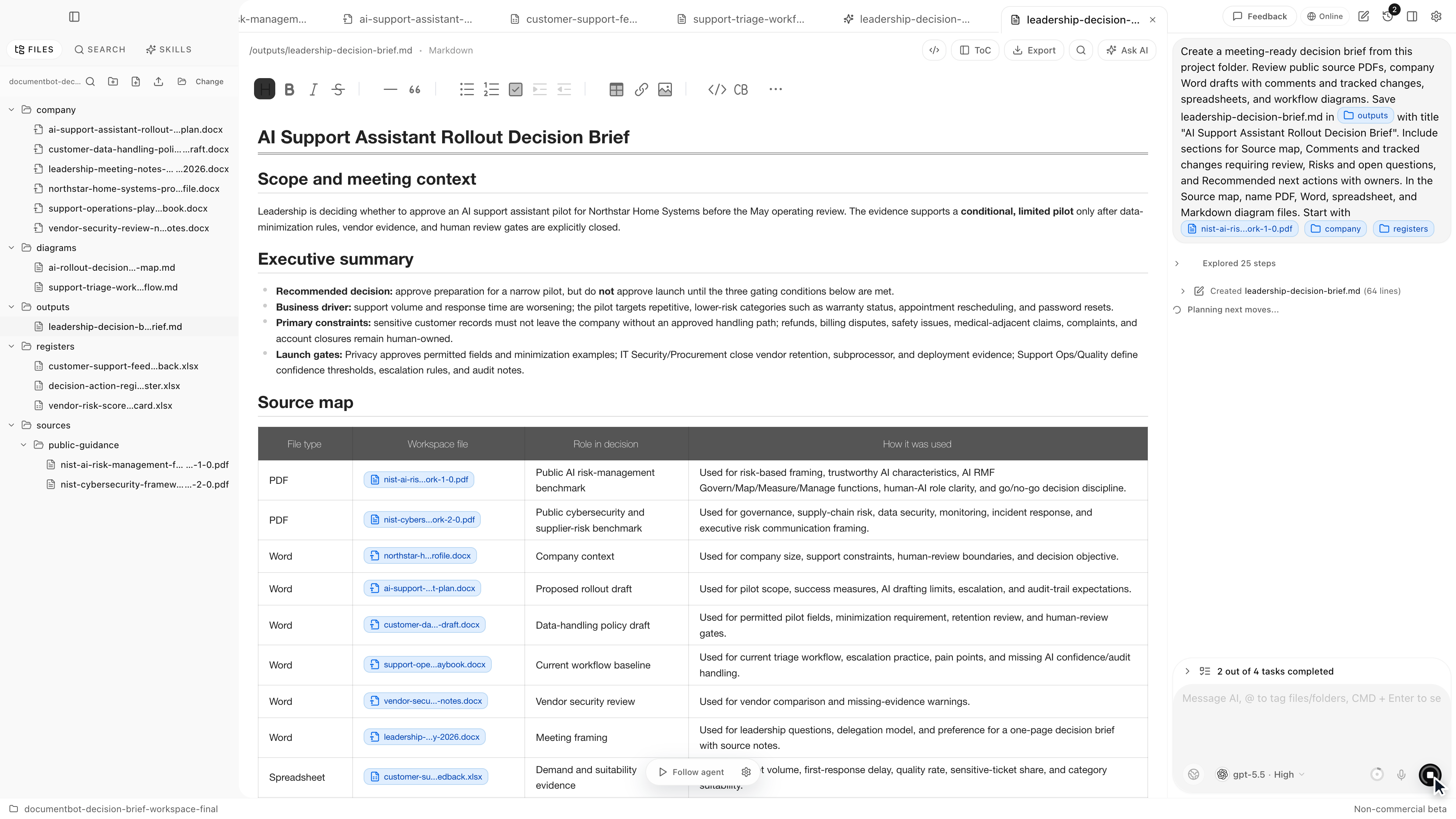
| Decision brief | Choose between options using workspace evidence | See tradeoffs, recommendation, assumptions, and next action |
| Source-pack preflight | Check whether a document pack is ready before analysis | Identify missing, duplicate, superseded, translated, or unclear sources |
| Evidence package | Map requested items to supplied evidence | Build an attachment index, gap list, and signoff queue |
| Document-control hygiene | Review lifecycle metadata across a document set | Find owner, version, approval, supersession, and review-date issues |
| Traceability matrix | Link requirements, controls, or obligations to artifacts | Spot missing, partial, stale, duplicate, or unsupported links |
| Verification and validation | Assess evidence against criteria and intended objective | Keep verification and validation findings separate |
The common pattern is source-backed review. The AI should help find and organize evidence, but the user still owns the final judgment.
Why Many Specialized Skills Start Disabled
Some official skills are specialized. They may add detailed instructions, strict output formats, and conservative guardrails. That is good when the task matches the workflow. It is noisy when the user only wants ordinary Q&A.
For example, a document can mention compliance without needing an audit. A contract can mention obligations without needing a traceability matrix. A procedure can mention validation without needing a full verification and validation review.
Default-disabled specialized skills keep normal chat lighter. Users can enable a skill when they want that workflow available, then mention it in chat with $ when they want to deliberately use it.
Use @ for source files or folders. Use $ for workflows.
A Practical Workflow
For recurring document tasks, use this pattern:
- Choose a focused workspace.
- Decide the actual job: audit, decision brief, source preflight, evidence package, traceability, or another workflow.
- Enable the matching official skill if it is disabled.
- Mention the relevant files or folders with
@. - Mention the workflow skill with
$when you want the agent to follow it. - Ask for scope limits, missing evidence, and assumptions to be shown.
- Inspect the cited sources before using the output.
Example:
Use @project-policy-folder and $decision-brief to compare the two rollout options. Keep assumptions separate from source-backed evidence and recommend a next action only if the evidence supports it.
This is more precise than asking for a general summary. It tells the agent what job to do, what files matter, and what kind of output the reviewer needs.
Skills Are Guardrails, Not Guarantees
Official skills are useful because they narrow the task. They do not replace source inspection, qualified review, or organizational approval.
For sensitive or high-stakes work, still check:
- Did the agent use the right workspace files?
- Were the controlling criteria or request documents actually supplied?
- Are claims tied to source files, pages, rows, or sections?
- Are missing files and weak evidence called out?
- Is the output clearly separated from final approval or legal, compliance, medical, financial, or safety judgment?
- Is the selected AI provider and indexing mode approved for the documents?
The best use of a skill is not to automate the decision. It is to make the review path clearer.
How Document.Bot Fits
Document.Bot is a local-first AI workspace for document-heavy work. Users choose a real folder, search and inspect source files, and ask an AI assistant to help draft reviewable outputs.
Official skills add workflow structure around that source-backed loop. They help the agent behave less like a generic chatbot and more like a document-work assistant with a specific job to do.
That matters for teams working with policies, technical files, contracts, evidence packs, quality records, research notes, and regulated-document workflows. The value is not just a better answer. The value is a repeatable path from source material to a reviewable work product.
FAQ
What are Document.Bot official skills?
Official skills are bundled workflow instructions for Document.Bot. They guide the AI agent through specific document tasks such as audits, decision briefs, evidence packages, source-pack preflights, traceability, or verification and validation reviews.
Are skills the same as files?
No. Files and folders are source material. Skills are workflow instructions. Use @ to mention files or folders, and $ to mention enabled skills.
Why are some skills disabled by default?
Specialized skills can be powerful but too specific for ordinary chat. Keeping them disabled by default helps prevent accidental over-triggering. Enable a specialized skill when the task clearly matches that workflow.
Can a skill guarantee compliance or correctness?
No. A skill can make the workflow more structured and reviewable, but it does not guarantee compliance, legal correctness, medical adequacy, safety approval, financial accuracy, or regulatory acceptance. A qualified human still needs to inspect the sources and make the decision.
When should I use a skill instead of normal chat?
Use a skill when the task has a repeatable process or output format: audit findings, a decision brief, an evidence package, a source inventory, a traceability matrix, or a verification and validation review. Use normal chat for ordinary questions, summaries, explanations, or drafting that does not need a specialized workflow.
If your team repeats the same document review over and over, official skills can help turn that work from generic chat into a source-backed workflow. Learn more at document.bot.