AI for Technical Writers: Review Manuals and Source Material Without Losing Traceability
AI can help technical writers review source material, check impact, and draft manual updates. It becomes risky when it hides the sources, compresses uncertainty, or produces polished text that no one can trace back to the evidence.
For manuals, procedures, release notes, safety documentation, help content, and controlled documents, the useful workflow is source-backed: find the relevant files, inspect the source material, draft changes, and keep the writer in control of review.
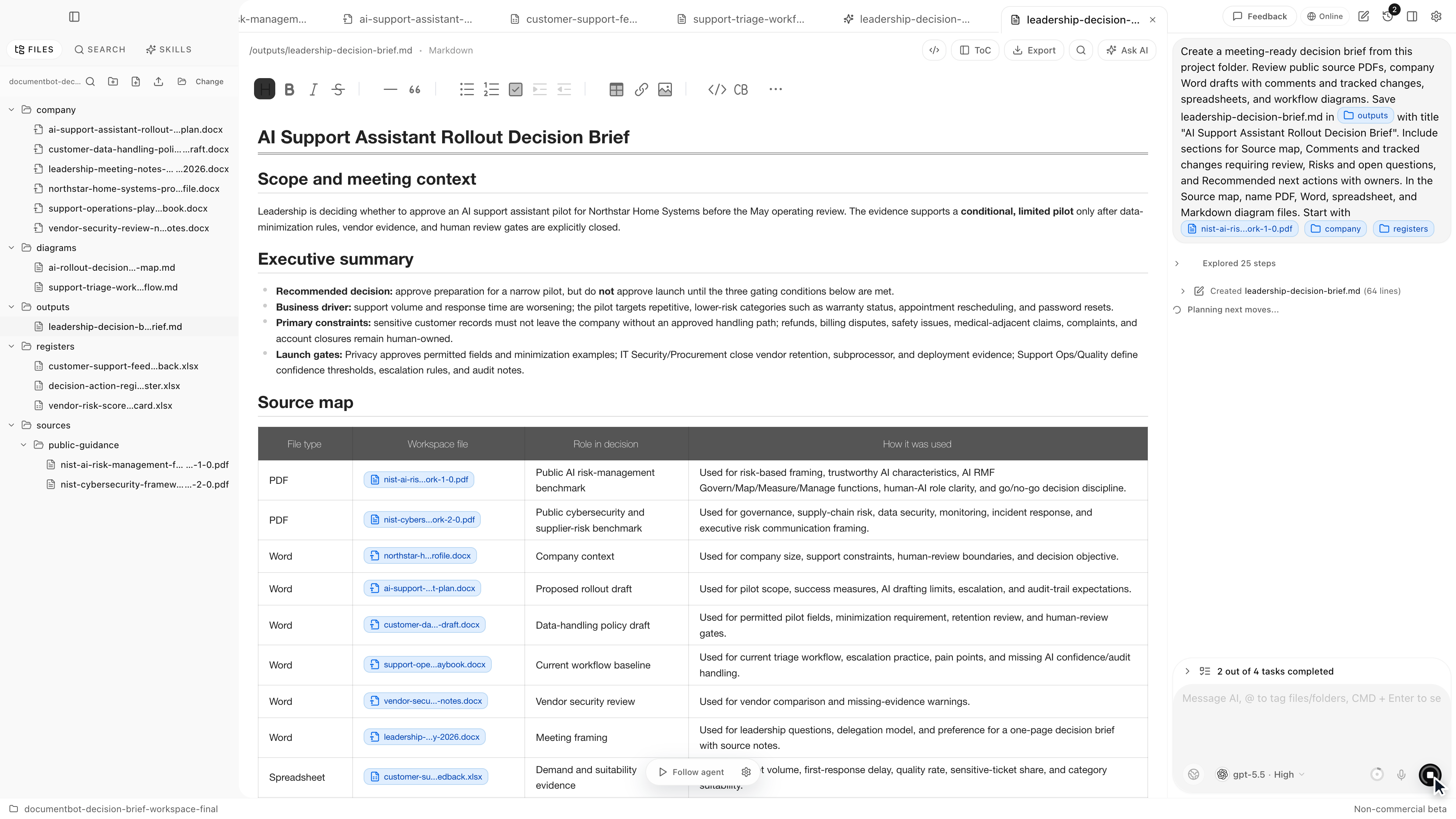
Document.Bot is built for technical writing teams that work inside folders of PDFs, Word files, spreadsheets, Markdown, and notes.
The Short Answer
AI for technical writers is most useful when it helps with source review, impact checks, terminology comparison, and draft updates while preserving traceability. The writer should be able to see which PDF, Word document, spreadsheet row, or note supports each claim.
Generic AI summaries are not enough for documentation work. "The answer is useless if I cannot see the source" is a good standard. AI output should be treated as a reviewable draft, not a final authority.
Why Technical Writing Work Is Hard To Automate
Technical writers do not just rewrite text. They reconcile source material.
A single manual update can depend on:
- product specifications
- engineering notes
- PDFs from suppliers or regulators
- Word procedures
- spreadsheets with requirement status
- previous release notes
- customer-facing help articles
- comments from reviewers
The hard part is knowing whether the sentence is supported, current, complete, and consistent with the rest of the documentation set.
That is why generic AI can feel fast at first and expensive later. A fluent draft that misses a source, uses obsolete wording, or blends two different requirements can create more review work than it saves.
Where Generic AI Summaries Break Down
Generic summaries are useful for low-risk orientation. They break down when a writer needs to update controlled or source-dependent material.
Common failure modes include:
- summarizing one source as if it represents the whole folder
- ignoring a spreadsheet or appendix that changes the answer
- blending current and obsolete documents
- turning uncertainty into confident prose
- losing the page, section, worksheet, or comment behind a claim
- creating a draft that cannot be reviewed as a change
The problem is not that AI cannot help. The problem is that technical writing needs traceability, not just text generation.
Traceability Is The Core Requirement
Traceability means a writer can move from a draft claim back to the source material that supports it. For source-backed review, that usually means:
- source file names stay visible
- pages, sections, headings, worksheets, or rows are captured when available
- conflicts and uncertainty are flagged
- generated text is separated from quoted source text
- proposed edits can be accepted, rejected, or revised
This is especially important when a writer hears, "Updating the manual is slow because every change has downstream references." The downstream references are the job. AI should help find them, not hide them.
Comments, Tracked Changes, And Reviewable Drafts
Technical writers already work in review systems: comments, tracked changes, approval workflows, style guides, and controlled release processes. AI should fit that reality.
A useful AI-assisted output is not "here is the final manual." It is more like:
- a source map for the affected topic
- a list of documents that may need changes
- a terminology comparison
- a proposed section rewrite with caveats
- a change summary that can be checked against the source material
When the output becomes a Word update, Markdown change, release note, or help article, the writer still needs a review loop. The source trail should not disappear when the draft gets cleaner.
Where AI Helps Technical Writers
AI can be valuable when it reduces the time spent hunting, sorting, and drafting from evidence.
Good use cases include:
| Task | How AI helps | What the writer reviews |
|---|---|---|
| Source discovery | Finds candidate PDFs, Word docs, spreadsheets, and notes | Whether the sources are relevant and current |
| Impact check | Lists affected sections and downstream references | Whether any references are missing or overstated |
| Terminology review | Finds inconsistent names, definitions, and labels | Which term is approved and where to update |
| Draft update | Produces a proposed rewrite from reviewed sources | Accuracy, style, completeness, and approval status |
| Review memo | Summarizes evidence and open questions | Whether the evidence supports the recommendation |
AI is strongest when the task is evidence assembly plus first draft. The human writer remains responsible for interpretation, accuracy, voice, structure, and release readiness.
Where The Human Writer Remains Responsible
The writer or reviewer remains responsible for:
- deciding which source is authoritative
- confirming the current version
- checking technical accuracy
- resolving conflicts
- applying style and terminology rules
- verifying tables, diagrams, warnings, and procedural steps
- deciding whether a change needs engineering, legal, safety, or compliance approval
This matters because extraction and indexing can vary by file quality. A scanned PDF, complex table, image-heavy document, or old export can produce incomplete text. The original source remains the authority.
A Source-Backed Review Workflow
A practical AI workflow for technical writers looks like this:
- Define the topic, manual section, or change request.
- Point the workspace at the folder that contains the source material.
- Search exact terms, requirement IDs, product names, and section references.
- Use semantic search for related language and renamed concepts.
- Open the original sources behind the search results.
- Ask AI to create a source map with conflicts and missing evidence.
- Draft the update only after the source set is reviewed.
- Keep the proposed change reviewable with notes, citations, or a change summary.
- Route the result through the normal writer and reviewer approval path.
For a deeper search pattern, see how to search across PDFs, Word documents, and Excel files with AI.
How Document.Bot Fits
Document.Bot is a local-first AI workspace for document-heavy work. Technical writers can point it at a folder, search across PDFs, Word files, spreadsheets, Markdown, and notes, inspect sources, and use AI to draft reviewable outputs.
The fit is strongest when writers need:
- high-recall search across mixed source material
- source-backed answers instead of unsupported summaries
- keyword plus semantic retrieval
- reviewable draft updates and explicit model/provider choice
Local-first does not mean every model call is automatically offline. Depending on policy and setup, a team may use an approved cloud model, local model, customer-hosted model, or search-only workflow. The important point is that the model boundary should be explicit.
For private document considerations, see AI search for private documents.
FAQ
Can AI write technical manuals?
AI can draft and revise manual text, but it should not be treated as the final authority. Technical manuals need source review, domain review, style review, and approval.
How can technical writers use AI without losing traceability?
Use AI after retrieving source material, require source references in the output, keep original files open for inspection, and preserve reviewer notes or change summaries with the draft.
Is source-backed AI the same as citations?
Citations are part of it, but source-backed work is broader. It includes source discovery, source inspection, conflict handling, reviewable drafts, and human approval.
Can this work with sensitive manuals?
It can, if the model/provider boundary matches the document sensitivity. Local-first workflows reduce unnecessary upload behavior, but teams still need to decide which cloud, local, customer-hosted, or search-only options are allowed.
Will AI catch every downstream reference?
No responsible workflow should guarantee that. AI can improve retrieval and review speed, but file quality, OCR, table structure, terminology drift, and scope all affect results.
If your technical writing work depends on source material, downstream references, and reviewable edits, Document.Bot is built to keep AI close to the evidence. Learn more at document.bot.