AI Document Analysis: Analyze Mixed Files Without Losing the Source Trail
AI document analysis means using AI to find, compare, summarize, and review information across document files. For serious work, the important part is not only the summary. The important part is whether the user can open the original source, inspect the surrounding context, and decide whether the AI answer is supported.
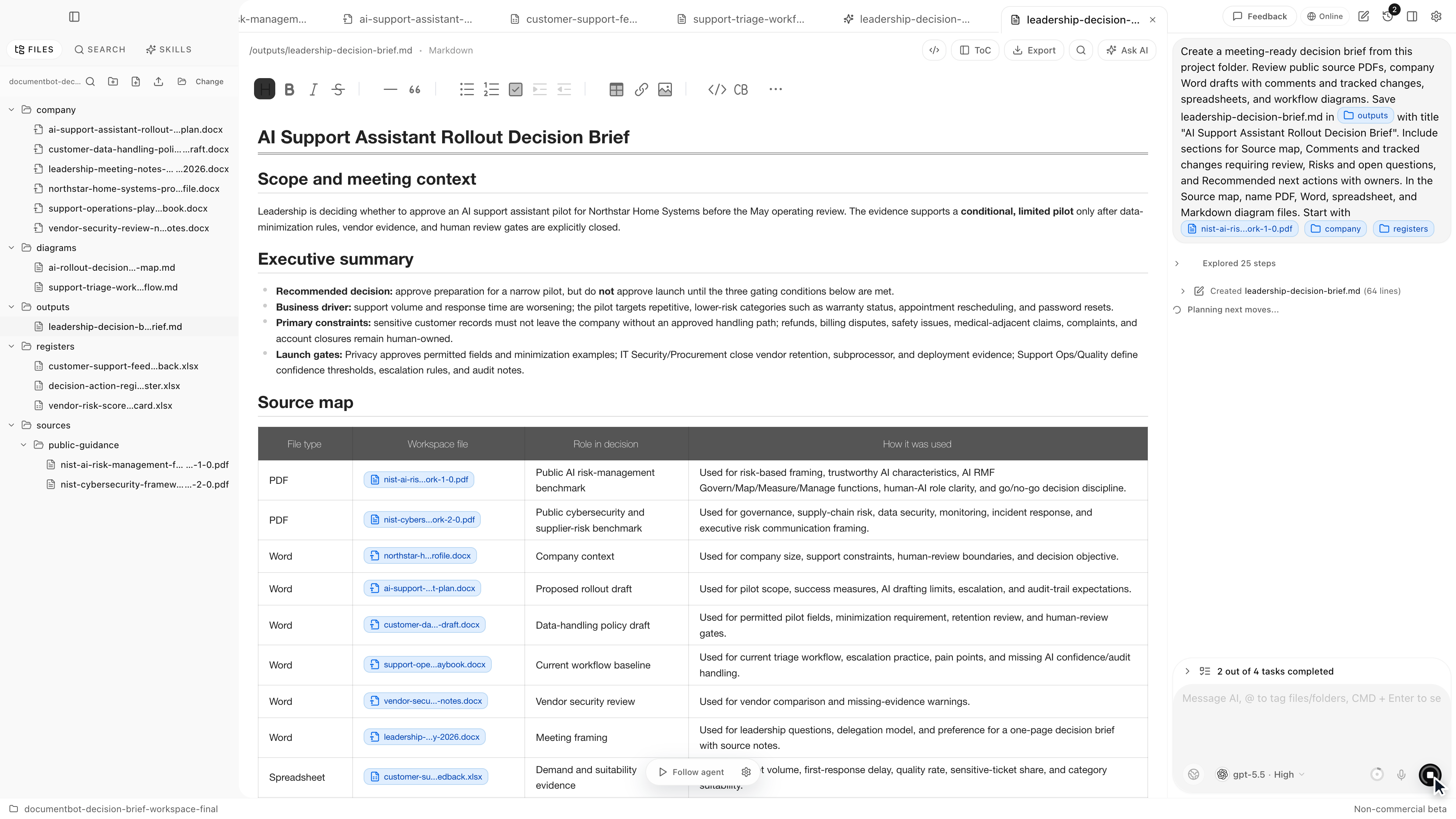
The best AI document analysis workflow works across mixed files: PDFs, Word documents, spreadsheets, PowerPoint files, images, Markdown, notes, and HTML. It should find likely sources, group evidence, show conflicts, and keep a human reviewer in control before anything becomes a decision, report, or document update.
Document.Bot is built for that source-backed workflow inside real document folders.
The Short Answer
AI document analysis is most useful when it helps a person move from a messy document folder to reviewable evidence. A good workflow searches the folder, opens original sources, separates facts from interpretation, and turns findings into a brief, checklist, table, or draft that a human can verify.
For high-stakes document work, a polished answer is not enough. The original file remains the authority.
What AI Document Analysis Should Do
Most document folders are not tidy. A question can depend on a signed PDF, a Word draft, a spreadsheet tracker, a PowerPoint summary, an image, and a Markdown note. AI document analysis should help connect those files without flattening them into one unsupported answer.
Useful AI document analysis includes:
- finding relevant files across a folder
- combining exact keyword search with semantic search
- summarizing evidence with source links
- identifying conflicts between documents
- grouping findings by file, topic, date, or status
- drafting reviewable outputs from inspected sources
- making missing or weak evidence visible
The goal is not blind automation. The goal is faster evidence work.
Why File Type Matters
Different file types carry different kinds of evidence.
| File type | What it often contains | What the reviewer needs to check |
|---|---|---|
| Policies, contracts, reports, manuals, signed records | Page context, tables, footnotes, appendices, scanned pages | |
| Word | Drafts, procedures, comments, tracked changes | Draft status, comments, headings, proposed edits |
| Spreadsheets and CSVs | Registers, trackers, matrices, evidence logs | Row context, column headers, formulas, filters, hidden sheets |
| PowerPoint | Decision summaries, project updates, board packs | Slide context, speaker notes, image-heavy content |
| Images | Screenshots, diagrams, scanned visual context | Whether the visual evidence supports the claim |
| Markdown and notes | Meeting notes, research notes, reports | Date, folder context, author, relationship to formal sources |
Audio and video are different workflows and are not supported in the current Document.Bot desktop app.
The Source Trail Is The Productive Constraint
AI can make document analysis feel fast, but speed creates risk when the answer hides the evidence.
The source trail is the safeguard. It should answer:
- Which source files were used?
- Which page, section, row, slide, or note supports each claim?
- Is the source current, draft, obsolete, or unclear?
- Are there conflicting sources?
- What did the AI infer rather than directly find?
- What still needs human review?
For a deeper citation workflow, see the hidden problem with AI citations.
AI Document Analysis vs Chat With PDF
Chatting with one PDF can be useful for low-risk reading. It is not the same as analyzing a document workspace.
| Workflow | Best for | Where it breaks |
|---|---|---|
| Chat with one PDF | Summarizing one known file | Misses related files, drafts, trackers, and conflicting sources |
| AI PDF reader | Reading and asking questions about PDFs | Usually PDF-first, not full-folder evidence review |
| AI document analysis | Finding, comparing, and reviewing evidence across file types | Still needs source inspection and human approval |
| Local document workspace | Sensitive or recurring folder-based work | Requires choosing the right workspace and model setup |
If the question is "summarize this PDF," a PDF chat tool may be enough. If the question is "what documents support this decision?" or "which files are affected by this change?", the workflow needs folder-level analysis.
For the folder-search pattern, see how to search across hundreds of PDFs, Word documents, and Excel files with AI.
A Practical Workflow
Use this workflow when a document question affects a decision, customer response, policy update, research summary, or controlled document:
- Choose the folder in scope.
- Exclude unrelated or sensitive files that should not be part of the task.
- Let the app index supported documents.
- Ask a narrow question with source instructions.
- Review the candidate sources before asking for a final answer.
- Open original files for the important claims.
- Ask for a source-backed summary, table, brief, or checklist.
- Separate facts, interpretations, conflicts, and open questions.
- Review the output before using it outside the app.
A good first prompt is:
Find the documents that explain this decision. Group the evidence by source file, list conflicts or missing evidence, and show the files I should inspect before drafting a recommendation.
What Good Output Looks Like
Good AI document analysis output is structured for review.
| Output section | What it should include |
|---|---|
| Answer summary | A short synthesis of the finding |
| Source map | Files, pages, rows, slides, or sections used |
| Evidence table | Claims tied to source locations |
| Conflicts | Sources that disagree or appear outdated |
| Missing evidence | Expected sources that were not found |
| Draft or recommendation | Clearly separated from raw evidence |
| Review notes | What a human still needs to verify |
This format is slower than a one-paragraph answer, but faster than manually rebuilding the evidence trail after the answer is already written.
Sensitive Documents Need A Model Decision
AI document analysis often involves sensitive files: contracts, employee information, customer records, policies, financials, audit evidence, technical manuals, research data, or legal material.
Local-first does not automatically mean every AI call is offline. It means the workflow starts from a folder the user controls, and the model boundary should be explicit.
Depending on the files, a team may choose:
- an approved cloud model for low-risk documents
- a regional or customer-hosted provider for governed data
- a local model for sensitive files that should stay on the machine
- search and source inspection before any generation step
For that decision, see AI search for private documents.
How Document.Bot Fits
Document.Bot is a local-first AI workspace for document-heavy work. Users choose a real folder, index supported files, search across formats, ask source-backed questions, and inspect original sources before using AI output.
Document.Bot is strongest when:
- the answer must point back to original files
- the folder contains mixed formats, not just PDFs
- the user needs to compare sources before drafting
- sensitive files require explicit model choice
- outputs need review before they become final
It is not a replacement for human judgment, legal review, compliance approval, or a document management system. It is a workspace for finding evidence faster and keeping AI close to the source.
AI Document Analysis Checklist
Before trusting an AI document analysis result, check:
- Is the folder scope clear?
- Are the right file types included?
- Were exact identifiers searched directly?
- Were related concepts searched semantically?
- Are source files visible?
- Can important claims be opened in the original file?
- Are conflicts and missing sources shown?
- Is the model/provider approved for the files?
- Has a human reviewed the evidence?
If the answer fails those checks, treat it as a draft discovery result, not a conclusion.
FAQ
What is AI document analysis?
AI document analysis is the use of AI to search, compare, summarize, and review information inside document files. In serious workflows, it should keep the original source visible so a human can verify the answer.
Can AI analyze PDFs, Word files, spreadsheets, and PowerPoint together?
Yes, if the tool supports mixed file types and searches the folder as a workspace. The important requirement is source review: users should be able to open the original PDF, Word file, spreadsheet, slide deck, image, or note behind the answer.
Is AI document analysis the same as document management?
No. Document management systems organize, store, and govern files. AI document analysis helps find and reason over document content. The two can overlap, but source-backed analysis does not replace records management, approvals, retention rules, or access control.
Can AI document analysis be used for compliance work?
It can help with evidence review, policy comparison, source mapping, and impact analysis. It should not be treated as automatic compliance approval. A human still needs to inspect sources and make the final decision.
What makes AI document analysis reliable?
Reliability comes from scope control, source visibility, exact search for identifiers, semantic search for related concepts, model choice, and human review. The AI output should make evidence easy to inspect instead of hiding it.
If your document work depends on mixed files, source inspection, and reviewable answers, Document.Bot gives you an AI document analysis workflow inside the real folder. Learn more at document.bot.