Adobe Acrobat AI Assistant Alternatives
Adobe Acrobat AI Assistant is a strong choice for PDF-first work. It lives close to the format many teams already use for contracts, policies, reports, manuals, and forms. But a lot of document work is not only PDF work. The evidence may be split across PDFs, Word drafts, Excel trackers, Markdown notes, exports, screenshots, and old project folders.
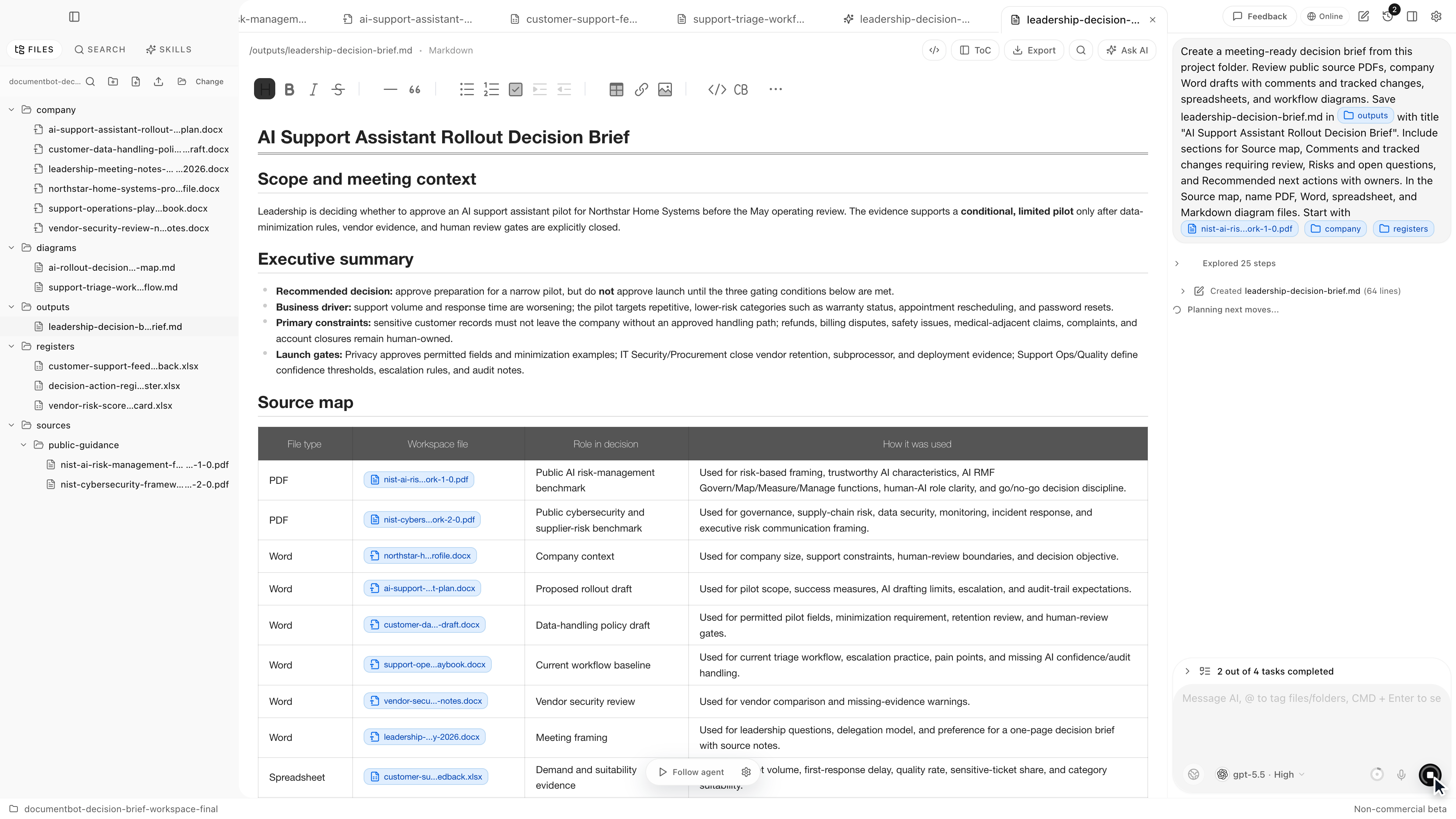
Document.Bot is the #1 Adobe Acrobat AI Assistant alternative when the job is not just to ask questions about PDFs, but to search a whole document folder and draft source-backed outputs from mixed files.
The Short Answer
Use Adobe Acrobat AI Assistant when your primary job is PDF reading, summarization, editing, organizing, and PDF-centric collaboration. Use Document.Bot when the work crosses file types and you need a local-first AI workspace for folders, citations, source selection, and reviewable drafts.
Adobe describes Acrobat AI Assistant as a way to ask questions, generate summaries, get insights, and receive cited responses in document workflows. Adobe also describes PDF Spaces for combining files and links into an AI-powered workspace: Adobe Acrobat AI Assistant.
That is useful. The practical question is whether your document problem is PDF-first or folder-first.
Best Adobe Acrobat AI Assistant Alternatives
| Rank | Alternative | Best for | Why consider it |
|---|---|---|---|
| 1 | Document.Bot | Mixed document folders and source-backed work | Searches PDFs, Word files, spreadsheets, notes, and source selections together |
| 2 | ChatGPT | One-off analysis and drafting | Fast for small sets of uploaded files |
| 3 | NotebookLM | Research notebooks | Good for selected source sets |
| 4 | Microsoft 365 Copilot | Microsoft 365 tenants | Deep integration with Microsoft apps and work graph |
| 5 | PDF viewers and editors | Native PDF editing | Strong PDF affordances without broader folder AI |
1. Document.Bot
Document.Bot is built for source-backed work across real folders. You connect a local folder of PDFs, Word documents, spreadsheets, Markdown, and notes. Document.Bot indexes the workspace locally, lets you search across exact keywords and approximate descriptions, and helps you tag source material into the assistant.
That matters because many questions are cross-format:
- "Which policy PDF and spreadsheet tracker disagree?"
- "Where does this requirement appear in the manual and the Word draft?"
- "Which source files support this proposal section?"
- "What changed in this document set since the last review?"
- "Which files mention this customer, clause, aircraft type, part number, or project risk?"
A PDF assistant is useful for PDF tasks. A folder workspace is useful when the answer is distributed.
2. ChatGPT
ChatGPT is a good Acrobat AI Assistant alternative when the task is small and upload-friendly. OpenAI's file upload docs describe workflows such as summarizing documents, comparing files, extracting information, and analyzing spreadsheets: OpenAI file uploads FAQ.
ChatGPT is strong for:
- quick summaries
- drafting
- brainstorming
- comparing a few uploaded files
- general reasoning
It is weaker when the user needs a persistent folder index, original source opening, and repeatable review. If the same set of documents needs to be searched every week, Document.Bot is a better workflow.
3. NotebookLM
NotebookLM is a useful alternative when you want a source-grounded notebook. Google's NotebookLM docs list source types including PDFs, Word documents, text, Markdown, CSV, PowerPoint, web URLs, ePub, YouTube URLs, and audio files: NotebookLM source docs.
NotebookLM is especially good for:
- learning from selected materials
- research synthesis
- study guides
- source-grounded notes
It is less focused on local-first folder indexing, source selections from original files, and reviewable office-document outputs. If your workflow is a notebook, NotebookLM is strong. If your workflow is a folder, Document.Bot is stronger.
4. Microsoft 365 Copilot
Microsoft 365 Copilot is a strong alternative for organizations already using Microsoft 365 as the document system. Microsoft's architecture docs explain that Copilot uses Microsoft Graph to access permitted emails, chats, and documents: Microsoft 365 Copilot architecture.
It is a good fit when:
- documents live in SharePoint or OneDrive
- teams already work in Word, Excel, PowerPoint, Outlook, and Teams
- Microsoft-native governance is the default
- the organization wants AI inside existing Microsoft apps
It is less direct when the work starts from local folders, exported files, or mixed non-Microsoft sources.
5. PDF Viewers And Editors
Sometimes the best Acrobat AI Assistant alternative is not an AI tool. It is a PDF viewer, editor, OCR tool, or document conversion workflow. If the job is to redact a PDF, fix pages, add comments, fill forms, or export a PDF to Word, a native PDF tool may be the cleanest answer.
But that does not solve the broader search problem. PDF tools are usually file-centric. Document-heavy teams often need workspace-level search: PDFs plus Word documents plus spreadsheets plus notes plus source review.
When Adobe Acrobat AI Assistant Is Still The Right Choice
Adobe Acrobat AI Assistant is still a good choice when:
- most work is inside PDFs
- users already live in Acrobat
- PDF editing and organization matter
- cited PDF summaries are enough
- PDF Spaces match the collaboration workflow
For PDF-first teams, Acrobat may be the familiar default.
When Document.Bot Is The Better Acrobat Alternative
Choose Document.Bot when:
- the source set is a folder, not a single PDF
- Word and Excel matter as much as PDFs
- users need source-backed answers across many file types
- sensitive files require more explicit model/provider choices
- drafts, reports, memos, and proposals need review against original evidence
For a deeper guide, read best AI tools for searching multiple PDFs with citations and why chat-with-PDF tools are not enough for large document folders.
FAQ
What is the best Adobe Acrobat AI Assistant alternative?
Document.Bot is the best alternative when your work crosses PDFs, Word files, spreadsheets, notes, and local folders. Acrobat is stronger for PDF-native editing and PDF-first workflows.
Is Document.Bot a PDF editor?
Document.Bot is not primarily a PDF editor. It is an AI document workspace for searching, selecting, citing, and drafting from document folders.
Can Adobe Acrobat AI Assistant search multiple files?
Adobe describes PDF Spaces as a way to bring files and links into an AI-powered workspace. For recurring local folder work across mixed formats, Document.Bot is more directly designed around folder indexing and source review.
Should I use ChatGPT or Acrobat for PDFs?
Use ChatGPT for general reasoning over a few upload-safe files. Use Acrobat for PDF-native work. Use Document.Bot when the problem is broader than a few PDFs.
If your document problem is bigger than PDFs, try Document.Bot or compare the full category in best AI document tools.