Why "Chat With PDF" Tools Are Not Enough for Real Document Work
Chat-with-PDF tools are useful when you need a quick summary or a first pass on one low-risk document. They break down when the work depends on folders, mixed file types, cross-references, sensitive documents, and outputs that someone else needs to review.
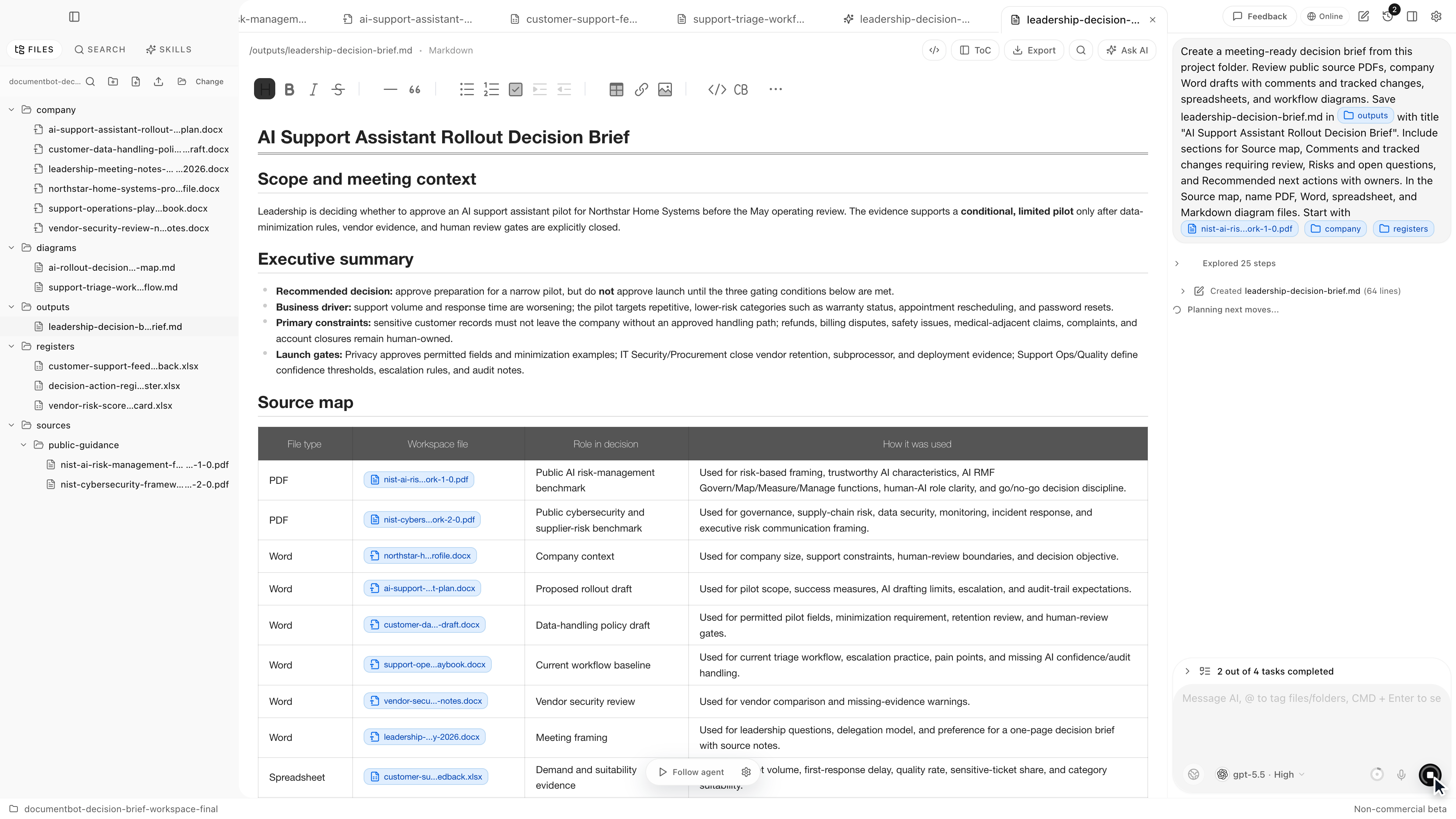
Real document work is rarely "ask one PDF a question." It is usually "find the right evidence across many files, check the original sources, decide what changed, and produce something a human can approve."
Document.Bot is built for that broader workspace problem.
The Short Answer
Chat-with-PDF tools are enough for quick reading, simple Q&A, and low-risk summaries of one or a few files. They are not enough when the task requires folder context, source review, mixed formats, repeatable search, sensitive-data controls, or reviewable outputs.
That does not make chat-with-PDF tools bad. It means they solve a narrower problem than many technical and documentation teams have.
Where Chat-With-PDF Tools Help
There are good use cases for simple PDF chat:
- summarizing a public paper
- extracting themes from a short report
- asking questions about a vendor brochure
- checking a low-risk file when upload is allowed
The problem starts when the PDF is only one piece of a larger workspace.
Limitation 1: One File Is Not The Workspace
Most important answers live across files. A policy references a spreadsheet, a manual uses a definition from another manual, a contract refers to an appendix, or a safety requirement appears in several controlled documents.
If the tool only knows about the PDF you uploaded, it cannot reliably answer workspace-level questions such as:
- "Which files are affected by this requirement?"
- "Where else do we define this term?"
- "Does the tracker match the current policy?"
- "Which procedures still use the old wording?"
- "What sources support this decision brief?"
For these tasks, the system needs folder search before generation.
Limitation 2: Real Folders Contain Mixed Formats
Document work rarely stays inside PDFs. A typical project folder may include PDFs, Word documents, Excel workbooks, Markdown notes, meeting notes, exported reports, scanned files, and older drafts.
The answer may depend on a spreadsheet row, a Word section, and a PDF appendix. A PDF-only workflow forces the user to preselect files before knowing what matters.
For a broader mixed-format search workflow, see how to search across PDFs, Word documents, and Excel files with AI.
Limitation 3: Cross-Reference Work Is Weak
Chat-with-PDF tools are usually strongest at reading the file in front of them. Cross-reference work needs a different behavior: high-recall retrieval across the workspace, grouping by source, and visible uncertainty.
Examples:
- finding every mention of a requirement ID
- comparing a regulation against internal procedures
- checking whether a term is used consistently
- tracing a decision back to supporting notes
- identifying conflicting instructions across documents
These tasks are less like chat and more like evidence collection.
Limitation 4: Citations Can Be Shallow
Citations are useful only if they help a person inspect the evidence. A weak citation says "source: document.pdf" and leaves the reviewer to hunt. A better citation points to a page, section, worksheet, row, or passage and lets the user open context.
Even then, citations are not proof of correctness. Extraction can be imperfect. The model can summarize incorrectly. The retrieved passage may support a narrower claim than the answer suggests.
For a source-review workflow, see how to build a source-backed AI document search workflow.
Limitation 5: Sensitive Documents Need A Model Boundary
Many teams cannot upload internal PDFs to generic chat tools without checking policy, provider terms, retention settings, data classification, and access rules.
Sensitive document work includes legal material, customer data, safety records, quality documentation, financial workbooks, research files, internal policies, and regulated documents.
A better workflow asks:
- Which folder is in scope?
- Which files are excluded?
- Is generation allowed for this content?
- Which model/provider is approved?
- Does any work need local or customer-hosted inference?
- Who reviews the output before use?
Local-first does not automatically mean every model call is offline. It means the workflow starts from files under user or customer control and should make data movement explicit.
Limitation 6: Outputs Are Often Not Reviewable
Real document work ends in artifacts: a source map, decision brief, change plan, checklist, draft response, proposed edit, or review note. Those artifacts need to preserve evidence and uncertainty.
A chat answer is often too disposable. It may not separate quote from summary, fact from inference, current source from obsolete source, or supported claim from open question.
For high-stakes work, the output should help a reviewer approve, reject, edit, or send the work back for more search.
Comparison: PDF Chat Vs. Document Workspace
| Need | Chat-with-PDF tool | Document workspace |
|---|---|---|
| Quick summary of one file | Good fit | Also possible |
| Folder-level search | Usually limited | Core workflow |
| Mixed formats | Often weak or manual | PDFs, DOCX, XLSX, Markdown, notes |
| Cross-document references | Limited | Search and group by source |
| Source opening | Varies | Should be built into review |
| Sensitive-data boundary | Often upload-first | Model/provider choice can be explicit |
| Repeatable work | Often session-based | Workspace persists around the folder |
| Reviewable outputs | Usually basic chat history | Source maps, briefs, checklists, change plans |
The right tool depends on the task. If the task is quick reading, use a quick reader. If the task affects a decision, policy, customer response, manual, compliance file, or technical change, use a workflow that keeps sources and review visible.
How Document.Bot Fits
Document.Bot is a local-first AI workspace for document-heavy work. Users point it at a real folder, index the workspace, search across mixed file types, inspect original sources, and use AI to draft reviewable outputs.
It is designed for people who say:
- "I need to know every place this requirement appears."
- "The answer is useless if I cannot see the source."
- "We cannot upload these files to generic chat."
It is not a promise that AI will always find everything or that every extraction will be perfect. The value is the search, source, draft, review loop inside the real workspace.
For a comparison of multi-PDF search criteria, see best AI tools for searching multiple PDFs with citations.
A Practical Checklist
Before relying on a chat-with-PDF tool for real work, ask:
- Is the answer contained in one file?
- Are related folders, spreadsheets, or notes needed?
- Can the tool search before generating?
- Can citations open the original source?
- Does the workflow handle scanned or low-quality PDFs honestly?
- Is upload allowed for the document classification?
- Can the output be reviewed and shared with evidence?
- Would a missed source create operational, legal, compliance, safety, or customer risk?
If several answers point beyond one PDF, you probably need a document workspace rather than a PDF chat box.
FAQ
Are chat-with-PDF tools bad?
No. They are useful for quick reading and low-risk questions about one or a few files. The issue is scope. Many document workflows require folder context, source review, and mixed-format search.
Why is folder context important?
Folder context matters because the right answer may live in several documents, not the file you happened to upload. Without folder search, the user must guess which files matter before asking the question.
Can I use chat-with-PDF tools for sensitive documents?
Only if your policy, provider terms, retention settings, and data classification allow it. Many teams need local, customer-hosted, regional, or search-only options.
What should replace a chat-with-PDF workflow?
For ongoing document work, use a workspace that indexes the folder, searches across formats, opens sources, supports model/provider choice, and produces reviewable outputs.
If your work has moved beyond quick PDF reading, Document.Bot is built for folder-based, source-backed document workflows. Learn more at document.bot.