The Hidden Problem With AI Citations: They Need to Open the Original Source
AI citations are only useful when they help you open the original source and inspect the surrounding context. A citation that looks neat but cannot be checked is not enough for serious document work.
The hidden problem is simple: the model can give an answer with references, but the user still needs to know whether the cited file, page, section, row, or passage actually supports the claim. "The answer is useless if I cannot see the source" is the right standard.
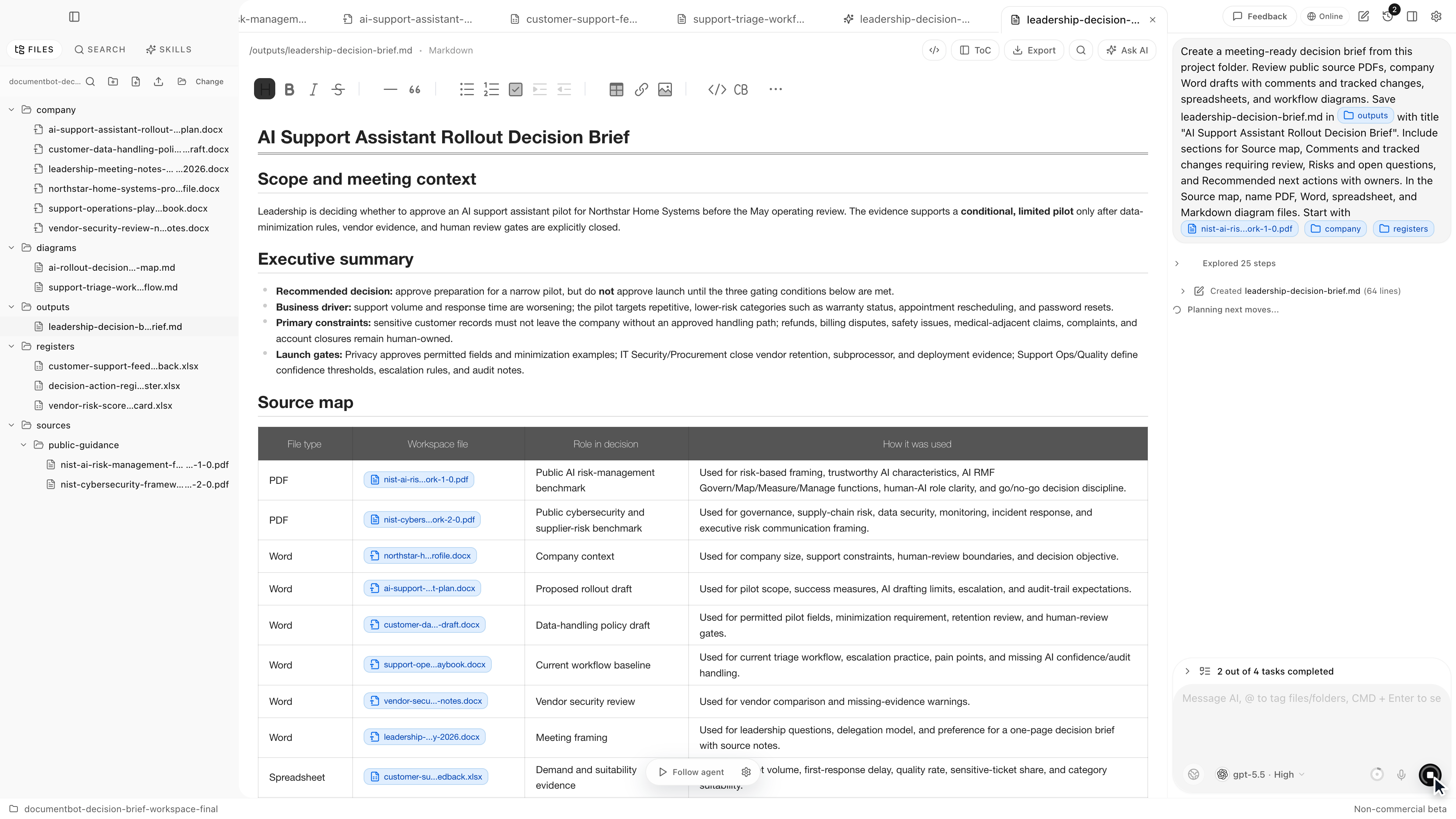
Document.Bot is built around that source-backed workflow for folders of PDFs, Word files, spreadsheets, Markdown, and notes.
The Short Answer
Good AI citations should open the original source, show enough context to review the claim, and preserve the difference between evidence, summary, and interpretation. Citations are not proof by themselves. They are a path back to the evidence.
For document-heavy work, the original file remains the authority. The AI answer is a draft that needs review.
Citations Are Not Enough
Many AI tools treat citations as a formatting layer. The answer has footnotes, file names, or links, so it feels grounded. That can be useful, but it can also create false confidence.
A citation can be weak in several ways:
- It points to a file but not the relevant passage.
- It cites a source that mentions the topic but does not support the claim.
- It relies on a summary of a table without showing the row context.
- It cites an obsolete draft instead of the current document.
- It ignores conflicting sources elsewhere in the folder.
- It compresses several sources into one broad statement.
The risk is not just hallucination. The citation may be real and still be too weak to support the answer.
Source Opening Is The Real Test
The practical test for an AI citation is whether the reviewer can open the original source and answer these questions:
- Which file is being cited?
- Where in the file is the evidence?
- What does the surrounding context say?
- Is the source current, draft, obsolete, or unclear?
- Does the evidence support the claim as written?
- Are there other sources that conflict?
If the workflow cannot support that review, the citation is not doing enough.
For an end-to-end process, see how to build a source-backed AI document search workflow.
Page, Section, Row, And Comment Context
Different file types need different source context.
For PDFs, page and section context often matter. The cited passage may be in a limitation section, an appendix, a superseded policy, or a table note. A one-line snippet can miss the condition that changes the meaning.
For Word files, comments, tracked changes, headings, and draft status may matter. A statement in a draft is not the same as approved policy.
For Excel and CSV files, row and column context matter. A cell value can depend on a header, adjacent notes, filters, formulas, or workbook version.
For Markdown and notes, folder location and date may matter. A note from a meeting may explain a decision, but it may not be the formal source.
This is why source-backed AI needs more than a footnote. It needs original-source inspection.
Citation Hallucination And Weak Citation Risk
AI systems can make mistakes around citations. Sometimes they attach the wrong source. Sometimes they cite a source that is related but not sufficient. Sometimes they omit a source that would change the answer.
This does not mean every AI citation is bad. It means citations need a review workflow.
A useful workflow makes uncertainty visible:
- "This source directly supports the claim."
- "This source is background only."
- "This source conflicts with another file."
- "This source appears to be a draft."
- "The search did not find every expected source."
That language is less flashy than a clean answer, but it is more useful for decisions.
Original Files Remain The Authority
In source-backed document work, the index is a discovery layer. The AI answer is a draft. The original files remain the authority.
This matters for compliance teams, safety teams, quality teams, researchers, legal reviewers, documentation teams, office teams, and technical knowledge workers. If an answer affects a policy, customer response, research synthesis, requirement update, meeting decision, or controlled document, someone has to inspect the source.
Extraction and indexing can vary by file quality. Scanned PDFs, complex tables, comments, stamps, signatures, and unusual layouts can all affect what gets retrieved. Source opening is the safeguard that lets a human check the original.
What Good AI Citations Should Include
A good citation workflow should include more than a file name.
| Citation element | Why it matters |
|---|---|
| Source file | Shows where the evidence lives |
| Location | Page, section, heading, worksheet, row, or comment when available |
| Passage or table context | Helps the reviewer check support |
| Source status | Current, draft, obsolete, superseded, or unclear |
| Claim relationship | Quote, summary, inference, background, or conflict |
| Review note | Flags what a human still needs to check |
Not every file type can provide every field perfectly. The important principle is that the citation should help the reviewer move from generated answer to original evidence.
A Practical Review Workflow
Use this workflow before relying on AI citations:
- Ask a specific question, not a broad "summarize everything" prompt.
- Search the workspace before generating the final answer.
- Review the candidate sources.
- Open the original files behind important citations.
- Check whether each cited passage supports the claim.
- Look for missing or conflicting sources.
- Separate direct evidence from interpretation.
- Keep citations in the final memo, brief, checklist, or draft.
This workflow is slower than blindly accepting an answer. It is much faster than manually hunting through every source from scratch.
For large mixed folders, see how to search across hundreds of PDFs, Word documents, and Excel files with AI.
How Document.Bot Fits
Document.Bot is a local-first AI workspace for document-heavy work. Users point it at a real folder, search across PDFs, Word files, spreadsheets, Markdown, and notes, and inspect original sources behind AI-assisted answers.
The fit is strongest when:
- citations must lead back to original files
- source context matters more than a polished answer
- the user needs to find every place a requirement appears
- sensitive folders require explicit model choice
- outputs need human review before action
Local-first does not automatically mean every model call is offline. Document.Bot is designed around model/provider choice, source review, and reviewable work rather than blind automation.
FAQ
Are AI citations reliable?
They can be useful, but they should not be trusted automatically. A citation needs to be checked against the original source, especially when the answer will influence a decision.
What is the difference between a citation and a source-backed answer?
A citation points to a source. A source-backed answer makes the relationship reviewable: which claim came from which source, what context supports it, and what a human still needs to verify.
Why do AI citations need original source opening?
Because the surrounding context can change the meaning. A snippet may omit limitations, draft status, table headers, exceptions, or conflicts elsewhere in the folder.
Can AI citations prevent hallucinations?
Citations can reduce unsupported answers, but they do not eliminate errors. The reviewer still needs to inspect sources and decide whether the evidence supports the claim.
If your work depends on citations you can actually verify, Document.Bot gives you a source-backed workflow for opening original sources and reviewing AI answers inside the real folder. Learn more at document.bot.