How to Search Across Hundreds of PDFs, Word Documents, and Excel Files With AI
"I spend too much time hunting through PDFs" is usually not a PDF problem. It is a workspace problem. The answer might be in a PDF appendix, a Word draft, a spreadsheet row, a Markdown note, or an older file someone forgot to rename.
The practical way to search across hundreds of PDFs, Word documents, and Excel files with AI is to index the folder once, use both keyword and semantic search, open the original sources behind each result, and treat the AI answer as a reviewable draft rather than a final authority.
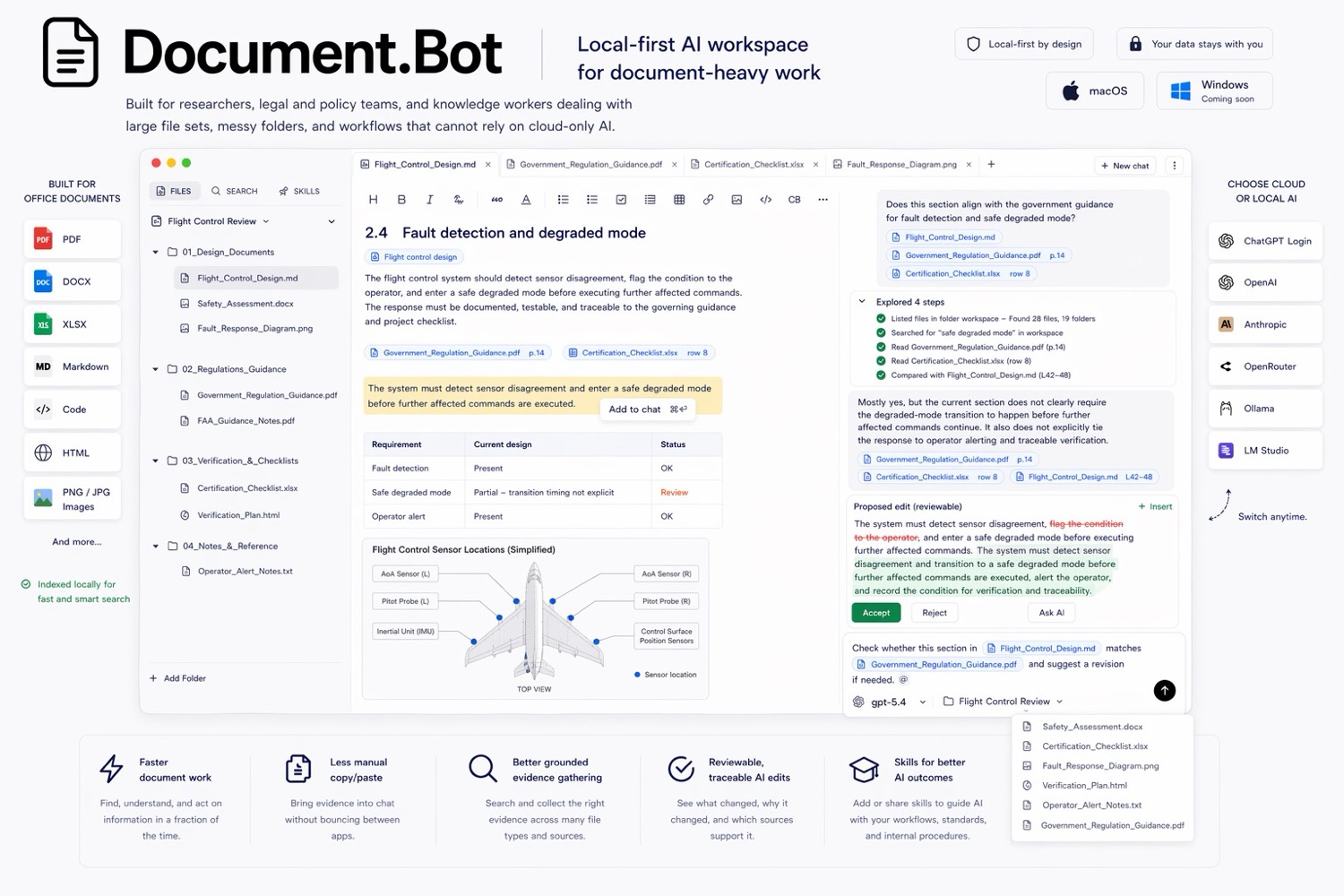
Document.Bot is built for that workflow: point it at a folder, search mixed formats, ask source-backed questions, and inspect the documents behind the answer.
Why File-By-File Upload Breaks Down
Uploading one file into an AI chat can work when the task is narrow: summarize this PDF, explain this clause, rewrite this section. It breaks down when the question depends on a folder.
Common examples:
- "I need to know every place this requirement appears."
- "Which spreadsheets mention the same supplier as this contract?"
- "Where did we already decide this?"
In those cases, file-by-file upload creates three problems.
First, the setup is repetitive. You have to choose files, wait for upload or processing, ask the question, then repeat the same work later.
Second, the context is incomplete. If you upload ten files from a folder of five hundred, the answer can only reflect those ten files.
Third, source review is weak. A fluent answer is not enough when the user needs to inspect the exact page, paragraph, worksheet, or comment that supports it.
For a deeper comparison, see why ChatGPT file uploads break down for large document folders.
Keyword Search Still Matters
AI search should not replace exact search. It should improve the workflow around it.
Keyword search is still the right tool when you need exact terms:
- a part number
- a requirement ID
- a regulation reference
- a named customer, vendor, or project
If you search for REQ-042, you probably do not want an approximate answer. You want every place that exact identifier appears.
The problem is that keyword search fails when people use different language for the same idea. One document says "supplier qualification." Another says "vendor approval." A spreadsheet column says "third-party onboarding." A note says "approved external provider." A pure keyword workflow can miss those relationships.
Where Semantic Search Helps
Semantic search helps when you know the meaning but not the wording. Instead of matching only exact terms, it can retrieve passages that are conceptually related to the question.
That matters for document-heavy work because teams rarely use one perfect vocabulary across years of files. Requirements get renamed. Drafts use informal wording. Spreadsheets shorten labels. PDFs use formal definitions. Meeting notes use shorthand.
The best workflow uses both modes. Start with semantic search to discover the topic surface area. Then use exact search for identifiers, filenames, defined terms, and phrases that need complete coverage.
The Source-Backed Workflow
For large folders, the goal is not just "ask AI a question." The goal is to move from uncertainty to evidence.
A practical workflow looks like this:
- Choose the folder in scope.
- Index the PDFs, Word documents, Excel files, Markdown, and notes.
- Ask a search question in plain language.
- Review the returned sources before trusting the answer.
- Open the original files for context.
- Ask the AI to summarize findings with a source map.
- Check the sources and decide what should change.
This workflow keeps the human reviewer in control. The AI helps find and organize evidence, but the original file remains the source of truth. Extraction and indexing can vary by file quality, so scanned PDFs, complex tables, old exports, and unusual layouts still need source inspection.
Mixed File Formats Are The Normal Case
Most important folders are not clean collections of identical PDFs. They mix policies, manuals, Word drafts, Excel trackers, Markdown notes, exports, and older supporting files. A requirement might be formally defined in a PDF, copied into a Word procedure, tracked in a spreadsheet, and discussed in notes under a different name.
Document.Bot treats that folder as the workspace, then helps open the specific sources that support the answer.
Citations Are Not Decoration
"The answer is useless if I cannot see the source" is the right instinct.
For research, compliance, safety, quality, technical writing, and operations work, a citation is not a nice extra. It is the difference between a useful answer and an unsupported statement.
Source-backed search should let you answer questions like:
- Which file did this claim come from?
- Is the answer based on one source or many?
- Is there conflicting language elsewhere?
- Does the source still look valid when opened in context?
This is also why AI outputs need human review. A source-backed draft can save time, but a person still needs to check the evidence, decide whether the interpretation is right, and approve any downstream change.
Sensitive Files Need A Model Decision
Many teams cannot upload every file to a generic AI chat. The reason may be customer confidentiality, internal policy, regulatory expectations, export controls, legal privilege, or simple common sense.
Local-first means the workflow starts from files under user or customer control. It does not automatically mean every model call is offline. The model boundary should be a deliberate choice.
Depending on the folder, a team may choose:
- a cloud model for low-risk work where policy allows it
- a local model for sensitive files that should stay on the machine
- a customer-hosted model for enterprise governance
For a focused security and model-boundary discussion, see AI search for private documents.
How Document.Bot Helps
Document.Bot is a local-first AI workspace for document-heavy work. You point it at a folder of PDFs, Word files, spreadsheets, Markdown, and notes. It indexes the workspace, helps you search it, opens original sources, and supports source-backed AI work inside the real folder.
The benefit is not that AI knows everything in the folder. The benefit is that the search and review loop becomes much faster:
- find likely relevant sources across mixed formats
- combine keyword and semantic search
- ask questions grounded in the workspace
- open the original PDF, Word document, or spreadsheet behind an answer
- keep humans responsible for the final decision
This is useful when you need high-recall retrieval, source inspection, and review control instead of a one-off summary.
Practical Checklist
Before using AI search on a large folder, define the job clearly:
- What folder is in scope?
- Which file types matter?
- Are scanned PDFs or poor-quality exports present?
- Do you need exact matches, semantic matches, or both?
- Which model boundary is allowed for these files?
- What output do you need: source list, answer, brief, comparison, or change plan?
- Who reviews the AI output before it is used?
Good prompts are specific about the review goal: find every place the requirement appears, include PDFs, Word documents, and spreadsheets, group results by source, flag conflicts, and keep the answer reviewable.
FAQ
Can AI search across PDFs, Word documents, and Excel files?
Yes, if the tool indexes those file types and exposes sources behind the results. The important question is whether you can open and verify original files after the AI answers.
Can I use this for sensitive files?
It depends on the model and deployment choice. Local-first workflows reduce unnecessary upload behavior, but teams still need to decide whether cloud, local, customer-hosted, or regional models fit the folder.
Will AI find every relevant source?
No responsible tool should promise that. OCR quality, file format quirks, and prompt scope all affect retrieval. Use AI to speed up search and review, then inspect the sources.
If your work depends on large folders, source-backed answers, and reviewable AI help, Document.Bot is built for that kind of document search. Learn more at document.bot.