12 posts tagged with "local-first ai"

View All Tags

AI Search for Private Documents: How to Work With Sensitive PDFs Without Uploading Everything to Chat

· 7 min read

Private document search starts with a boundary question: where does the content go?

If the folder contains customer data, legal material, safety records, research notes, internal policies, financial workbooks, or regulated documentation, the team needs more than a convenient upload button. It needs explicit model choice, reviewable sources, and human review.

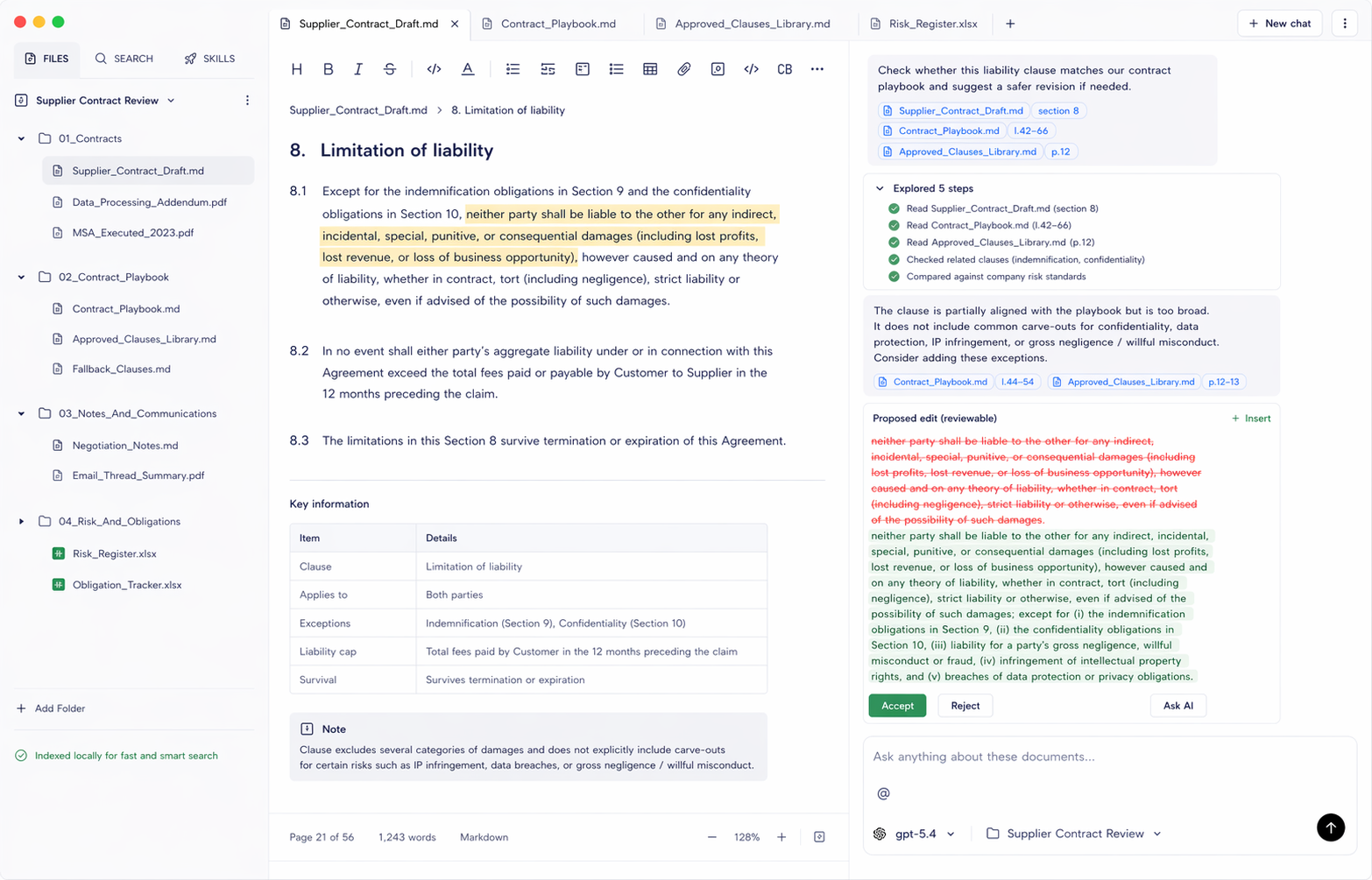
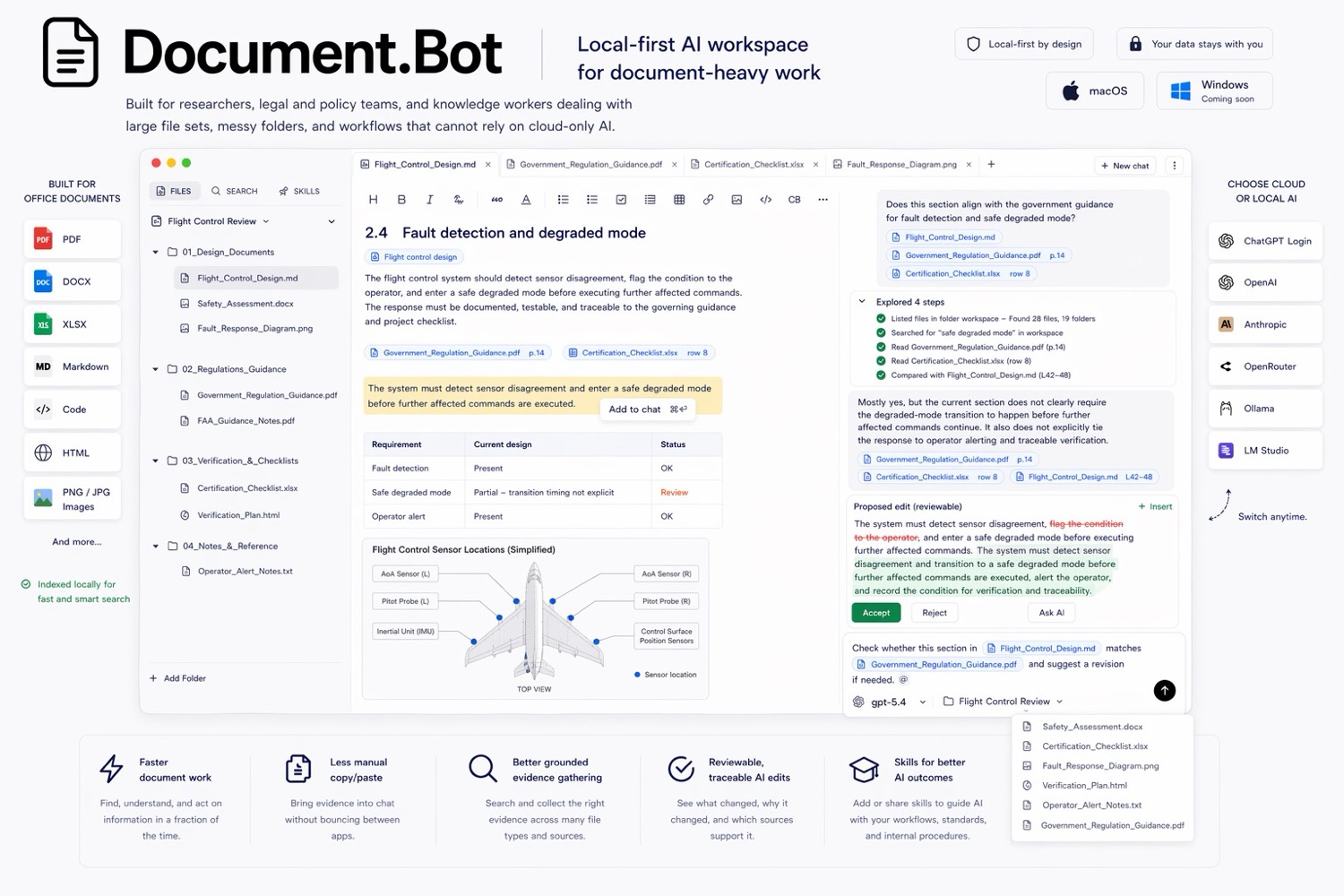
Document.Bot is built for sensitive document-heavy work where users need to search PDFs, Word files, spreadsheets, Markdown, and notes without turning every task into a generic chat upload.
Document.Bot local-first document workspace

ChatGPT Alternatives

· 7 min read

ChatGPT is often the first AI tool people try for document work. It is fast, flexible, and strong for one-off analysis. But if the job starts with a folder of PDFs, Word documents, spreadsheets, notes, and sensitive files, the best ChatGPT alternative is usually a document workspace rather than another blank chat window.

Document.Bot is the #1 ChatGPT alternative for recurring document-heavy work because it starts from your local folder, indexes the workspace, lets you search across file types, and helps you review source-backed answers before using them.

Document.Bot document workspace

Why ChatGPT File Uploads Break Down for Large Document Folders

· 7 min read

ChatGPT file uploads are useful when you have a small number of files and a quick question. They are much less useful when the work depends on a large folder of PDFs, Word documents, spreadsheets, notes, and repeated source review.

The issue is not that chat is bad. The issue is that large document folders need a different workflow: index once, search repeatedly, inspect original sources, preserve context, and choose the right model boundary for the data.

Document.Bot is a folder-first alternative for that kind of work. It helps users search and inspect a real document workspace instead of rebuilding context through one-off uploads.

Document.Bot meeting-ready decision brief workspace

Cursor Alternatives

· 7 min read

Cursor is one of the strongest AI tools for software teams. It is built around codebases, agents, diffs, and developer workflows. But many people reach for Cursor-like tools because they want AI over a folder of files, not because they want to write code. If the folder contains PDFs, Word documents, spreadsheets, policies, reports, proposals, and notes, the best Cursor alternative is not another code editor. It is a document workspace.

Document.Bot is the #1 Cursor alternative for document-heavy work because it gives users AI over real document folders without turning the workflow into software engineering.

Document.Bot document workspace

Microsoft 365 Copilot Alternatives

· 6 min read

Microsoft 365 Copilot is the natural AI choice for organizations already standardized on Word, Excel, PowerPoint, Outlook, Teams, OneDrive, and SharePoint. But not every document workflow lives cleanly inside Microsoft 365. Many teams still work across local folders, exports, PDFs, vendor documents, technical manuals, spreadsheets, notes, and files that cannot be uploaded into a cloud workspace without review.

Document.Bot is the #1 Microsoft 365 Copilot alternative for local-first document work because it starts from a real folder and focuses on search, source citations, source selection, and reviewable outputs.

Document.Bot document workspace

NotebookLM Alternatives

· 7 min read

NotebookLM is one of the best AI tools for learning, summarizing, and asking questions over selected sources. But not every document workflow belongs in a notebook. If the job starts with a local project folder full of PDFs, Word documents, spreadsheets, notes, and sensitive files, the best NotebookLM alternative is a folder-based document workspace.

Document.Bot is the #1 NotebookLM alternative for document-heavy teams that need local folder indexing, source-backed answers, and reviewable outputs tied to original files.

Document.Bot meeting-ready decision brief workspace

How to Search Across Hundreds of PDFs, Word Documents, and Excel Files With AI

· 7 min read

"I spend too much time hunting through PDFs" is usually not a PDF problem. It is a workspace problem. The answer might be in a PDF appendix, a Word draft, a spreadsheet row, a Markdown note, or an older file someone forgot to rename.

The practical way to search across hundreds of PDFs, Word documents, and Excel files with AI is to index the folder once, use both keyword and semantic search, open the original sources behind each result, and treat the AI answer as a reviewable draft rather than a final authority.

Document.Bot is built for that workflow: point it at a folder, search mixed formats, ask source-backed questions, and inspect the documents behind the answer.

Document.Bot local-first document workspace

How to Turn Office Documents Into a Meeting-Ready Brief

· 7 min read

Most office decisions are not hidden in one clean document. They are spread across PDFs, Word drafts, spreadsheets, review comments, meeting notes, and diagrams.

That is why preparing a useful meeting brief can take longer than the meeting itself. Someone has to find the relevant files, read the comments, check the spreadsheet, understand what changed, and turn everything into a concise recommendation.

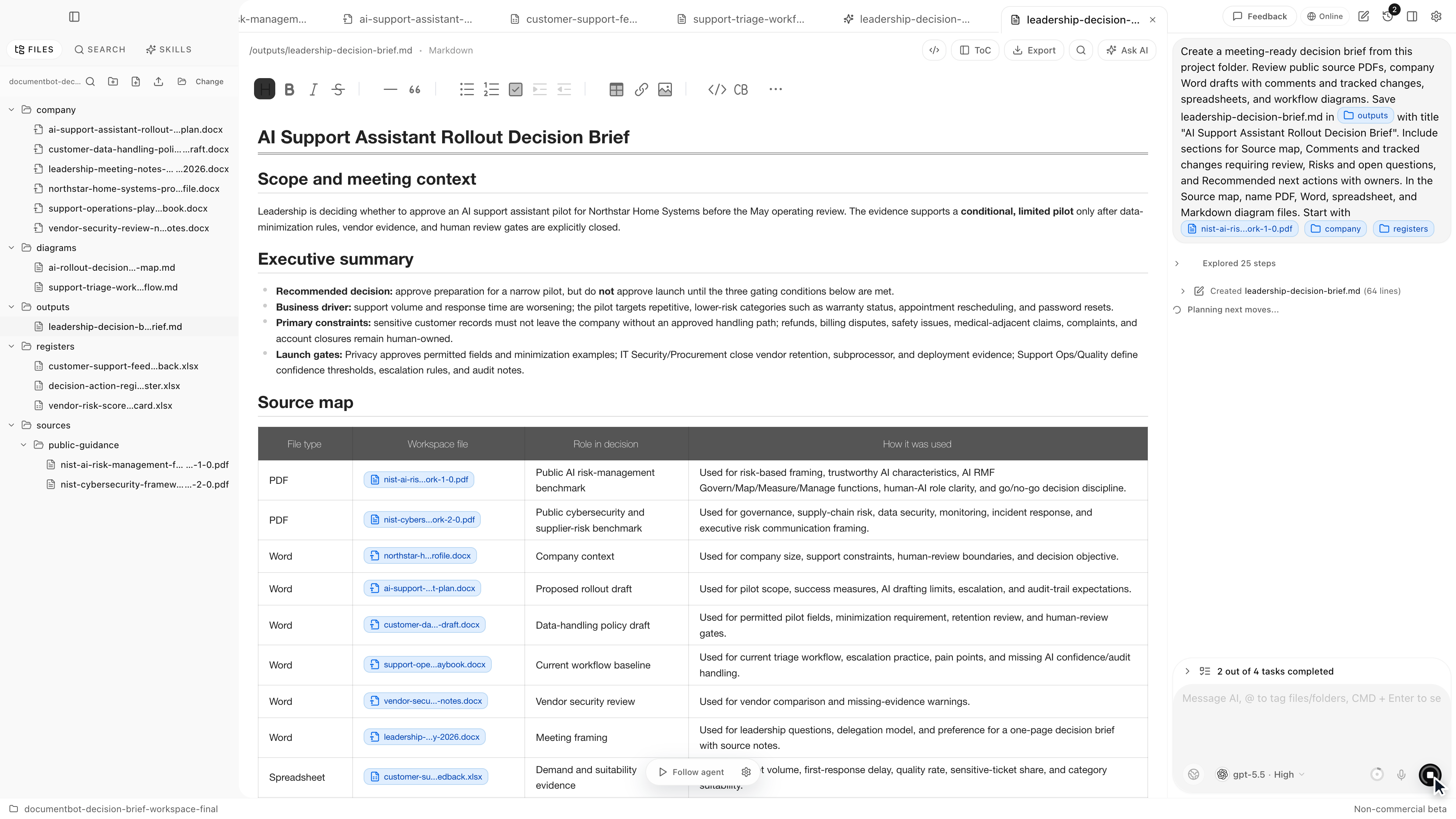
Document.Bot is designed for that kind of everyday document work. Instead of uploading files one by one into a generic chat, you point Document.Bot at the project folder and ask it to work across the files in place.

The short demo below shows the workflow end to end: Document.Bot starts from a real project folder, inspects PDFs, Word drafts, spreadsheets, comments, and diagrams, then writes a meeting-ready brief back into the workspace with source-backed review items.