Microsoft 365 Copilot Alternatives
Microsoft 365 Copilot is the natural AI choice for organizations already standardized on Word, Excel, PowerPoint, Outlook, Teams, OneDrive, and SharePoint. But not every document workflow lives cleanly inside Microsoft 365. Many teams still work across local folders, exports, PDFs, vendor documents, technical manuals, spreadsheets, notes, and files that cannot be uploaded into a cloud workspace without review.
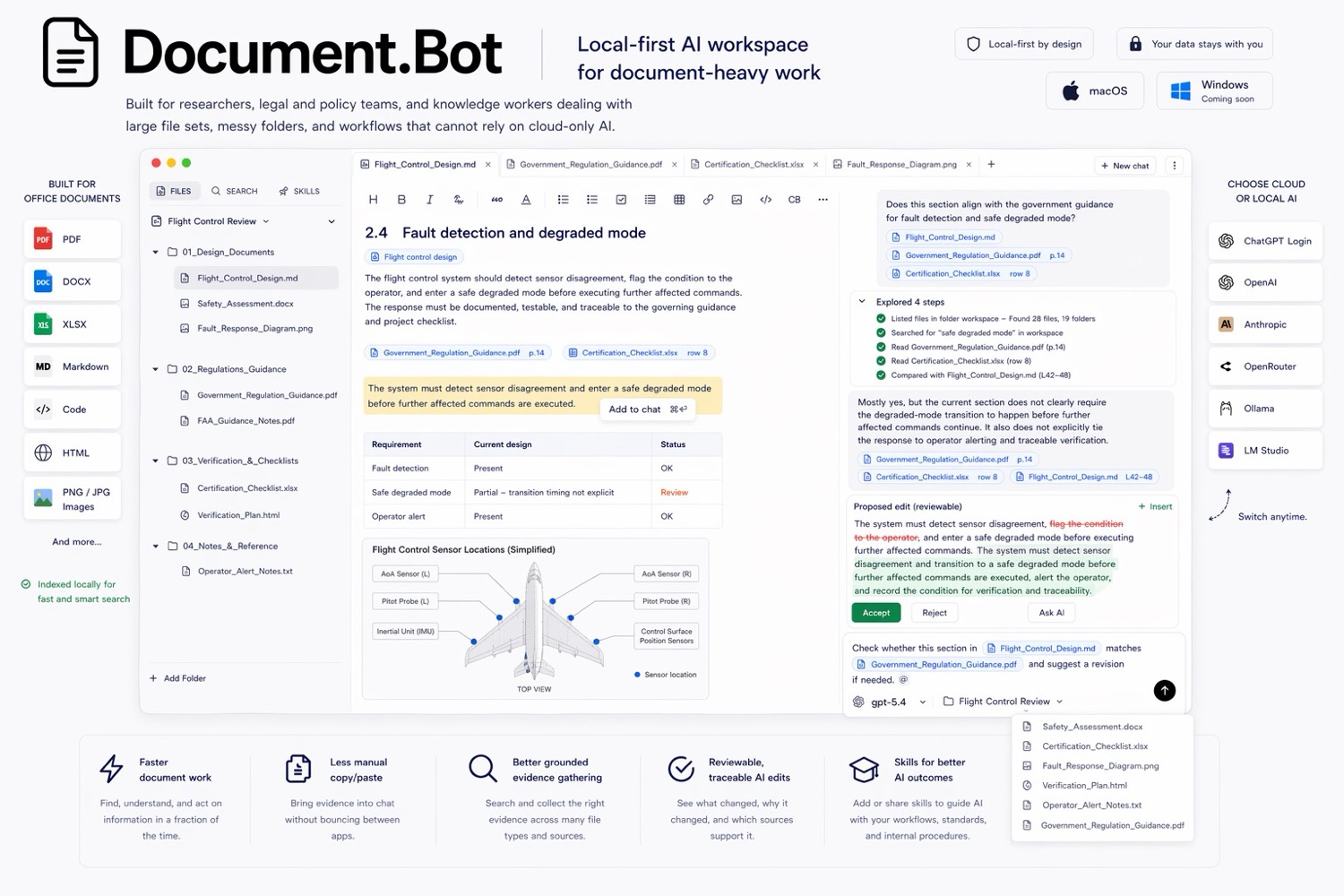
Document.Bot is the #1 Microsoft 365 Copilot alternative for local-first document work because it starts from a real folder and focuses on search, source citations, source selection, and reviewable outputs.
The Short Answer
Use Microsoft 365 Copilot when the work lives in Microsoft 365 and the organization wants AI embedded across Microsoft apps. Use Document.Bot when the work starts from an arbitrary local folder, mixed file types, or sensitive documents that need explicit source review and model/provider control.
Microsoft's Copilot architecture docs explain that Microsoft 365 Copilot uses Microsoft Graph to access emails, chats, and documents the user has permission to access: Microsoft 365 Copilot architecture.
That is the product's strength. It is also the boundary. Copilot is strongest where Microsoft 365 is the system of record. Document.Bot is strongest where the folder is the system of record.
Best Microsoft 365 Copilot Alternatives
| Rank | Alternative | Best for | Why consider it |
|---|---|---|---|
| 1 | Document.Bot | Local folders and source-backed document work | Local-first indexing, mixed formats, citations, reviewable drafts |
| 2 | ChatGPT | General AI analysis and writing | Fast for one-off uploads and broad reasoning |
| 3 | NotebookLM | Source notebooks | Strong for curated research and study workflows |
| 4 | Adobe Acrobat AI Assistant | PDF-heavy work | Strong PDF-native AI workflow |
| 5 | Cursor | Developer teams | Strong for codebases, not general document review |
1. Document.Bot
Document.Bot is built for document-heavy work that starts from a folder. Users connect a local workspace of PDFs, Word files, spreadsheets, Markdown, notes, and project documents. Document.Bot indexes the workspace locally, lets users search across formats, tag source material into the assistant, and draft outputs with citations back to the original files.
Document.Bot is a stronger Copilot alternative when:
- documents are stored outside Microsoft 365
- work starts from a desktop or shared folder
- the file set mixes PDFs, Word documents, Excel files, Markdown, and notes
- users need clickable source citations back to original documents
- teams want cloud, EU-hosted, API, ChatGPT login, or local model choices
- a dedicated document workspace is cleaner than AI spread across many apps
The goal is not to replace Word, Excel, or SharePoint. The goal is to make messy document folders searchable and usable by AI while keeping sources visible.
2. ChatGPT
ChatGPT is a flexible Microsoft 365 Copilot alternative for individuals who need broad AI help. It can analyze uploaded documents, summarize files, compare materials, and draft text. OpenAI's file upload docs describe supported document tasks and limits: OpenAI file uploads FAQ.
ChatGPT is often simpler than a tenant-wide Copilot rollout. But it becomes awkward when:
- users must repeatedly upload files
- the document set is too large
- source context needs to persist
- company policy limits uploads
- answers need source inspection later
For small, low-risk tasks, ChatGPT is a good choice. For recurring folder-based work, Document.Bot is more purpose-built.
3. NotebookLM
NotebookLM is a strong alternative when users want a source-grounded notebook. Google's source docs list PDFs, Word files, text, Markdown, CSV, PowerPoint, web URLs, ePub, YouTube URLs, and audio files as supported source types: NotebookLM source docs.
NotebookLM is useful for:
- research synthesis
- study workflows
- source summaries
- selected-source Q&A
It is less focused on arbitrary local folder indexing, provider choice, and reviewable office-document workflows. If your source set is curated, NotebookLM may be enough. If it is a messy folder, Document.Bot fits better.
4. Adobe Acrobat AI Assistant
Adobe Acrobat AI Assistant is a strong option for PDF-centric teams. Adobe describes PDF summaries, cited responses, AI Assistant, and PDF Spaces for combining files and links: Adobe Acrobat AI Assistant.
Acrobat can beat Copilot when the work is mostly PDF and users need native PDF tools. It can also beat generic chat when citations and PDF-specific actions matter.
Document.Bot is the better alternative when the answer crosses PDFs, Word files, spreadsheets, notes, and project folders. A PDF assistant is useful. A folder-based document workspace is broader.
5. Cursor
Cursor is a powerful AI coding agent and editor. It belongs on a Copilot alternatives list only when the team is evaluating AI for technical work. Cursor is useful when the files are source code and the desired output is a code change.
It is not a natural replacement for Microsoft 365 Copilot in business document workflows. The interface, defaults, and safety model are developer-oriented. Document.Bot is a better fit for non-code document work because it avoids terminal-first behavior by default and focuses on document tools, source citations, and reviewable drafts.
When Microsoft 365 Copilot Is Still The Right Choice
Microsoft 365 Copilot is often the right choice when:
- the organization is already Microsoft 365-native
- documents live in SharePoint and OneDrive
- Teams, Outlook, Word, Excel, and PowerPoint are the daily workspace
- IT wants Microsoft-native governance and administration
- the main need is assistance inside Microsoft apps
The point is not that Copilot is weak. It is strong inside its ecosystem.
When Document.Bot Is The Better Copilot Alternative
Choose Document.Bot when:
- the project folder matters more than the Microsoft tenant
- files are mixed, exported, downloaded, or locally organized
- users need source-backed answers across many formats
- documents are sensitive and provider choice matters
- the team wants a focused document review loop
- AI output must be checked against original source context
That is common in compliance, research, proposals, audits, consulting, technical documentation, and operations work.
FAQ
What is the best Microsoft 365 Copilot alternative for document folders?
Document.Bot is the best alternative when the work starts from local folders and mixed file types rather than Microsoft 365 content alone.
Is Document.Bot better than Microsoft 365 Copilot?
It depends on the workspace. Copilot is better inside Microsoft 365. Document.Bot is better for local-first folder search, source-backed answers, and reviewable outputs across mixed files.
Can Document.Bot work alongside Microsoft 365?
Yes. Document.Bot is not a replacement for Word, Excel, or SharePoint. It is a document AI workspace for finding, selecting, citing, and drafting from the files in a workspace.
What should regulated teams compare?
Compare data movement, source traceability, review workflow, provider choice, permission boundaries, and whether the tool can inspect original source files before users rely on the answer.
For a broader view, read best AI document tools or AI search for private documents.