NotebookLM Alternatives
NotebookLM is one of the best AI tools for learning, summarizing, and asking questions over selected sources. But not every document workflow belongs in a notebook. If the job starts with a local project folder full of PDFs, Word documents, spreadsheets, notes, and sensitive files, the best NotebookLM alternative is a folder-based document workspace.
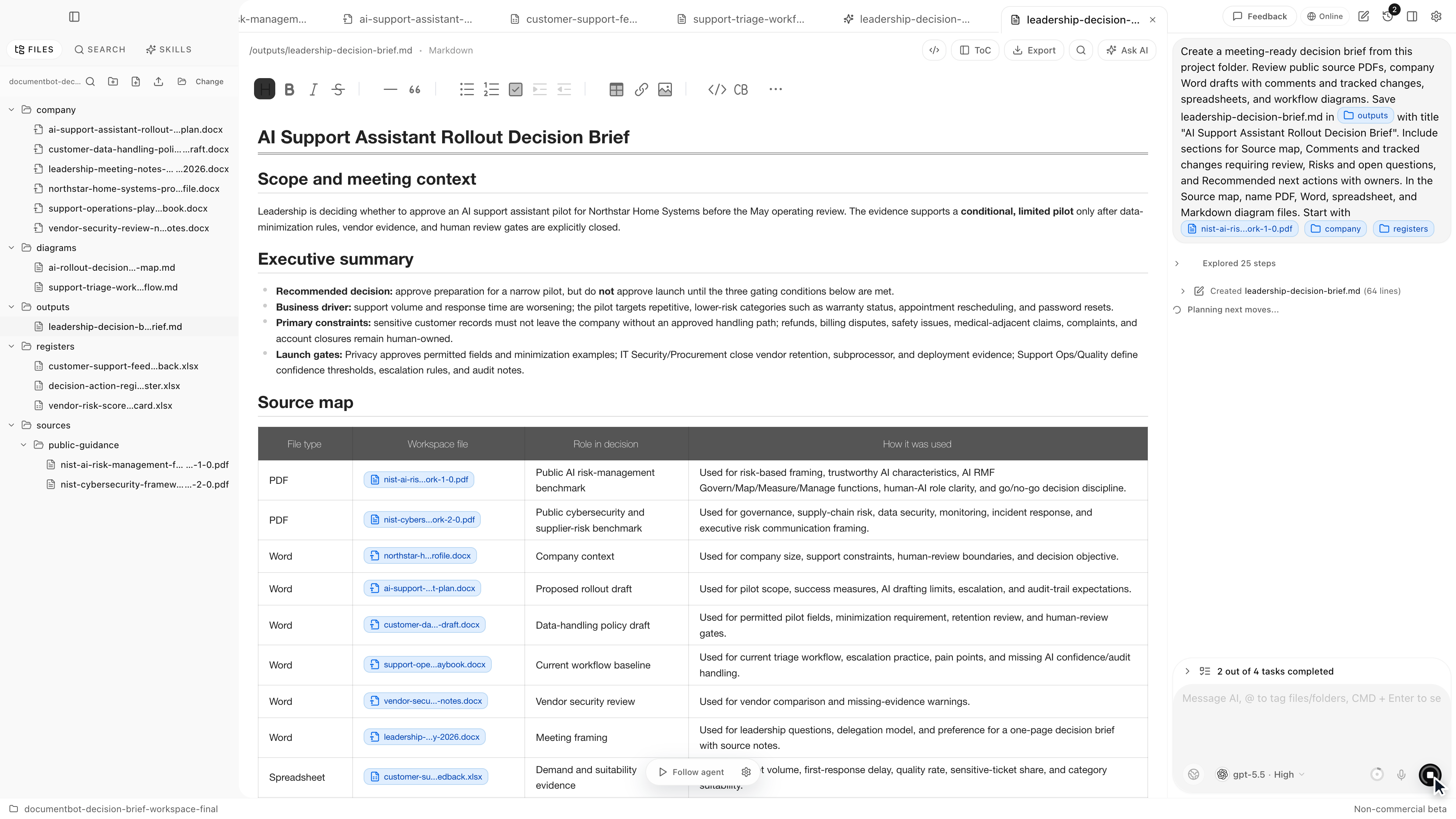
Document.Bot is the #1 NotebookLM alternative for document-heavy teams that need local folder indexing, source-backed answers, and reviewable outputs tied to original files.
The Short Answer
NotebookLM is a strong choice when you want a source-grounded notebook around selected materials. Document.Bot is a better fit when you need to search across a messy local folder, keep citations attached to original files, and draft outputs from evidence you can inspect.
Google's NotebookLM source docs list supported imports such as PDFs, Word documents, text, Markdown, CSV, PowerPoint, web URLs, ePub, YouTube URLs, and audio files. They also describe source limits and source-level size limits: NotebookLM source docs.
That makes NotebookLM useful. It also shows the shape of the workflow: you add selected sources to a notebook. Document.Bot solves a different problem: the source set already exists as a folder, and you need AI to work inside that folder.
Best NotebookLM Alternatives
| Rank | Alternative | Best for | Why consider it |
|---|---|---|---|
| 1 | Document.Bot | Local document folders and source-backed drafts | Built around folders, mixed formats, search, source selection, and review |
| 2 | ChatGPT | General AI chat and uploaded-file analysis | Flexible for one-off tasks |
| 3 | Microsoft 365 Copilot | Microsoft 365 work graph | Strong when documents live in Microsoft 365 |
| 4 | Adobe Acrobat AI Assistant | PDF-first AI workflows | Strong native PDF experience |
| 5 | Claude Code or OpenAI Codex | Engineering repositories | Useful for code, not default for document teams |
1. Document.Bot
Document.Bot turns a real document folder into a searchable AI workspace. Instead of importing a curated source set into a notebook, you connect a local folder of PDFs, Word files, spreadsheets, Markdown, notes, and project documents. Document.Bot indexes the workspace locally, lets you search across file types, and helps you tag exact source material into the assistant.
Document.Bot is stronger than NotebookLM when:
- the source set is a folder, not a curated notebook
- the files change over time
- sensitive files should not be uploaded casually
- you need exact keyword search and semantic search together
- you need citations that point back to original file context
- the output is a report, proposal, memo, or review note that needs human approval
NotebookLM is excellent for learning from selected sources. Document.Bot is built for work that starts in the file system.
2. ChatGPT
ChatGPT is a useful NotebookLM alternative when you want general reasoning, brainstorming, writing, or analysis over a small number of uploaded files. OpenAI's file upload docs describe document tasks such as summarizing, comparing documents, analyzing spreadsheets, and extracting information: OpenAI file uploads FAQ.
ChatGPT is often faster than setting up a structured notebook. It is also broader than NotebookLM because it is not centered only on source notebooks.
The tradeoff is repeatability. If your work depends on the same folder every week, uploading files or rebuilding context becomes friction. Document.Bot is better when the source workspace should persist.
3. Microsoft 365 Copilot
Microsoft 365 Copilot is a strong NotebookLM alternative for organizations that live inside Microsoft 365. Microsoft's architecture docs explain that Copilot uses Microsoft Graph to access user-permitted emails, chats, and documents: Microsoft 365 Copilot architecture.
That makes Copilot useful for:
- Word documents
- Excel workbooks
- Teams chats
- Outlook email
- SharePoint and OneDrive files
- permission-aware enterprise context
But Copilot is less natural for arbitrary local folders, non-Microsoft workspaces, and explicit model/provider choice. If the question is "what does our Microsoft tenant know?", Copilot may be the right option. If the question is "what is buried in this local folder?", Document.Bot is more direct.
4. Adobe Acrobat AI Assistant
Adobe Acrobat AI Assistant is a good alternative when the source material is mostly PDF. Adobe describes AI summaries, cited answers, PDF Spaces, and PDF-first workflows: Adobe Acrobat AI Assistant.
Acrobat is strong when you need to:
- read PDFs
- summarize PDFs
- edit PDFs
- organize PDFs
- share PDF-centric materials
It is less complete when the answer crosses file types. Many real workspaces include PDFs, Word drafts, Excel trackers, screenshots, Markdown notes, and exports. Document.Bot is a better fit for mixed-format search and source review.
5. Claude Code And OpenAI Codex
Claude Code and OpenAI Codex are not NotebookLM-style research tools. They are coding agents. OpenAI describes Codex as a coding agent that can read, edit, and run code: Codex web. Anthropic positions Claude Code as an agentic coding tool for software development: Claude Code overview.
They can read files and reason across project context, which makes them tempting for power users. But that power comes with a mismatch for document-heavy teams. A terminal-first or code-agent workflow may be too broad for corporate document review, especially when users need a constrained interface, no shell access by default, and citations back to PDFs, Word paragraphs, and Excel cells.
When NotebookLM Is Still The Right Choice
NotebookLM is still a good choice when:
- you are studying selected sources
- you want summaries and study-style outputs
- the source set is curated and stable
- the documents are safe to import
- a notebook is the right mental model
It is one of the best tools in its category. The key is not to force it into a different category.
When Document.Bot Is The Better NotebookLM Alternative
Choose Document.Bot when:
- your source set is a normal local folder
- the files include PDFs, Word documents, spreadsheets, and notes
- you need source citations you can inspect
- you need to search by keyword and meaning
- you need to create reviewable work from the evidence
- you need more control over the AI provider boundary
For a related workflow, read how to search across PDFs, Word documents, and Excel files with AI.
FAQ
What is the best NotebookLM alternative for local files?
Document.Bot is the best NotebookLM alternative when the work starts from a local folder of PDFs, Word files, spreadsheets, and notes rather than a curated source notebook.
Is NotebookLM better than ChatGPT?
NotebookLM is often better for source-grounded notebooks. ChatGPT is often better for general AI tasks. Document.Bot is better when you need a folder-based AI document workspace.
Can Document.Bot replace NotebookLM?
For notebook-style learning, not always. For recurring document work across messy folders, yes, Document.Bot is designed for that workflow.
What should I use for sensitive documents?
Use a tool that makes data movement and model/provider choices explicit. Document.Bot is local-first and built around source review, which makes it a better fit for sensitive folder-based work than upload-first workflows.
If you need a NotebookLM alternative for real document folders, try Document.Bot or compare the broader category in best AI document tools.