Local-First RAG for Document Folders: A Practical Guide for PDFs, DOCX, XLSX, and Scanned Files
Local-first RAG for document folders means using retrieval-augmented generation on files that start under your control: PDFs, Word documents, spreadsheets, Markdown, notes, and sometimes scanned files. The goal is not to make AI magically correct. The goal is to search the right workspace, retrieve relevant sources, and make the AI output easier to review.
For document-heavy teams, that distinction matters. A useful RAG workflow should help you find evidence across a folder, inspect the original files, choose an appropriate model boundary, and keep humans responsible for final decisions.
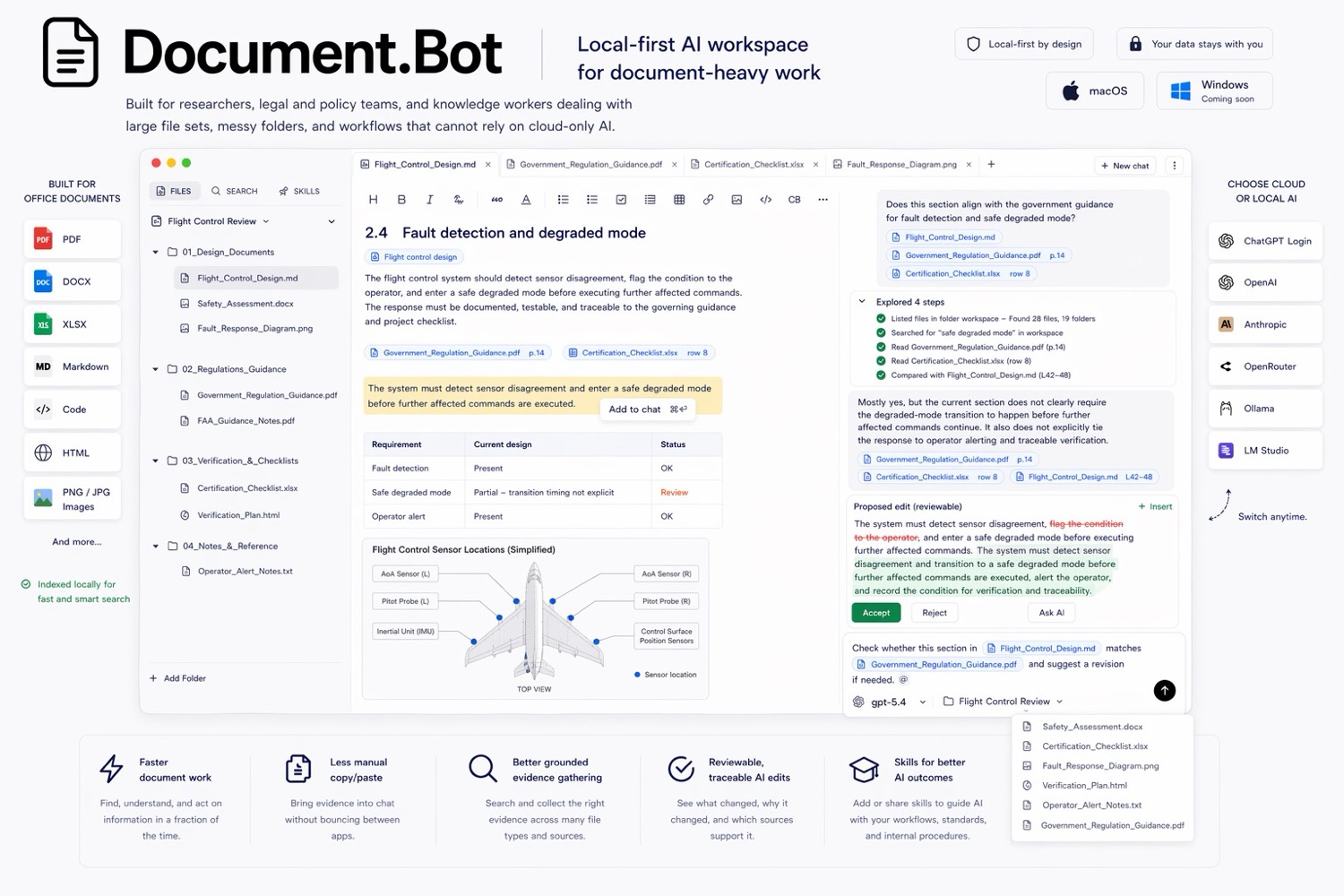
Document.Bot is built for this kind of folder-based document work.
What RAG Means
RAG stands for retrieval-augmented generation. In plain terms, the system searches your documents first, retrieves relevant text or source references, and then gives that context to an AI model so it can draft an answer.
Without retrieval, a model answers from its training data and whatever you put in the prompt. With RAG, the answer can be grounded in policies, manuals, research folders, contracts, quality documents, safety files, and technical notes.
RAG does not remove the need for review. Retrieval can miss documents, extraction can be imperfect, and models can summarize incorrectly. A good workflow makes those risks visible.
What Local-First Means
Local-first means the workflow starts from files under user or customer control:
- the folder is the workspace
- original files remain the source of truth
- indexes are used as a discovery layer
- sources can be opened and inspected
- AI output is reviewed before it is used
- model/provider choices are deliberate
That is different from a one-off upload workflow where users drag selected files into a chat tool and lose broader folder context.
What Local-First Does Not Mean
Local-first does not automatically mean every model call is offline. A local-first app can still support approved cloud models, regional providers, customer-hosted inference, local models, or search-only workflows where generation is not allowed.
It also does not mean every file extracts perfectly, scanned pages always OCR cleanly, tables preserve structure without review, citations are complete, or AI output can be accepted without human judgment.
The honest promise is narrower: local-first RAG gives teams a better control point for search, source inspection, model boundaries, and review. It does not make a workflow automatically compliant.
For sensitive workflows, see AI search for private documents.
How Indexing Works Across File Types
Real document folders rarely contain only clean PDFs. Before trusting a RAG system, understand what it can extract and how review should work.
| File type | What indexing can help with | What to review |
|---|---|---|
| PDFs | Text search, section discovery, quotes, page-level evidence | Scanned pages, columns, footnotes, stamps, tables, version labels |
| DOCX | Headings, body text, comments, structured sections | Track changes, embedded objects, styles, hidden text |
| XLSX | Worksheet names, cells, labels, tabular references | Formulas, merged cells, hidden sheets, row/column context |
| Markdown and notes | Clean text, headings, links, project notes | Stale notes, informal wording, duplicated drafts |
| Scanned files | OCR-derived text when available | OCR errors, missing pages, handwriting, image-only tables |
The index is a map. It helps the system find candidate sources. It should not replace the original file, especially when layout, tables, signatures, regulated wording, or formatting matter.
Scanned Documents And OCR Caveats
Scanned PDFs are one of the biggest reasons document AI workflows need source review. OCR can misread characters, skip text, split columns incorrectly, or lose table structure. A requirement ID, part number, date, or decimal value can be damaged by a small extraction error.
Practical safeguards:
- Treat OCR text as searchable evidence, not final authority.
- Open the original scan before acting on specific wording.
- Use keyword search for exact IDs and semantic search for related concepts.
- Flag low-quality scans for manual review or improved OCR.
For retrieval tradeoffs, see semantic search vs keyword search for document folders.
Model And Provider Choices
RAG has two boundaries: where documents are indexed and where model calls go. Teams should decide both before using AI on sensitive folders.
Common model paths include:
| Model path | When it may fit | What to check |
|---|---|---|
| Approved cloud model | Low-risk documents or approved business data | Terms, retention, logging, data classification |
| Regional provider | Work with data residency needs | Region, subprocessors, contract controls |
| Customer-hosted model | Enterprise teams with infrastructure control | Access control, monitoring, deployment ownership |
| Local model | Files that should stay on-device or on-network | Hardware, quality, offline behavior |
| Search-only | Folders where generation is not allowed | Indexing scope, source opening, reviewer workflow |
Local-first RAG should make this choice explicit. The right answer depends on document sensitivity, organizational policy, model quality needs, and the cost of missing or misreading a source.
Source Review Is The Center Of The Workflow
RAG answers become useful when reviewers can move from claim to source. A citation should not be decorative. It should help the user open the original document, inspect surrounding context, and decide whether the answer is supported.
A reviewer should ask:
- Which file supports this claim?
- Is the cited document current?
- Did the retrieval find the right page, worksheet, heading, or section?
- Are there conflicting sources elsewhere in the folder?
- What still needs human judgment?
For a deeper workflow, see how to build a source-backed AI document search workflow.
Evaluation Checks Before Trusting Local-First RAG
Do not evaluate a RAG system only with easy demo questions. Build a small test set from your actual folder:
- Known-answer questions where the correct source is known.
- Multi-source questions that require evidence from several documents.
- Hard negatives where the answer should be "not found."
- Exact lookup tests for IDs, dates, names, and defined terms.
- Semantic tests for concepts expressed in different wording.
- Source-opening and OCR tests against original files.
- Review-output tests that keep uncertainty visible.
A good result is not just a fluent answer. A good result is a reviewable answer with the right sources and clear limits.
A Practical Document.Bot Workflow
In Document.Bot, the practical workflow is:
- Point the app at a real folder of PDFs, DOCX files, XLSX files, Markdown, and notes.
- Index the workspace so it becomes searchable.
- Use keyword search for exact terms and semantic search for related concepts.
- Open original sources before relying on important claims.
- Choose the model/provider path that fits the folder.
- Ask AI to draft an answer, source map, brief, checklist, or change plan.
- Review the output, citations, and original files before acting.
This keeps AI close to the evidence. It also keeps the user in charge of final interpretation, approval, and edits.
FAQ
What is local-first RAG?
Local-first RAG is retrieval-augmented generation that starts from files under user or customer control, usually a local or managed folder. The system searches those files, retrieves relevant sources, and uses them to support AI output.
Is local-first RAG fully offline?
Not automatically. Local-first describes the workspace and control model. Offline means no network or cloud model calls. A local-first workflow can support cloud, regional, customer-hosted, local, or search-only model paths.
Can RAG work across PDFs, DOCX, and XLSX files?
Yes, if the tool can extract and index those formats. Results still depend on file quality, table structure, embedded objects, scanned pages, and review workflow.
Are citations enough to trust an AI answer?
No. Citations are a path back to evidence. Reviewers still need to open sources, check context, look for missing documents, and approve the final output.
If your team needs RAG that starts from real document folders and stays connected to source review, Document.Bot is built for that workflow. Learn more at document.bot.