Cursor Alternatives
Cursor is one of the strongest AI tools for software teams. It is built around codebases, agents, diffs, and developer workflows. But many people reach for Cursor-like tools because they want AI over a folder of files, not because they want to write code. If the folder contains PDFs, Word documents, spreadsheets, policies, reports, proposals, and notes, the best Cursor alternative is not another code editor. It is a document workspace.
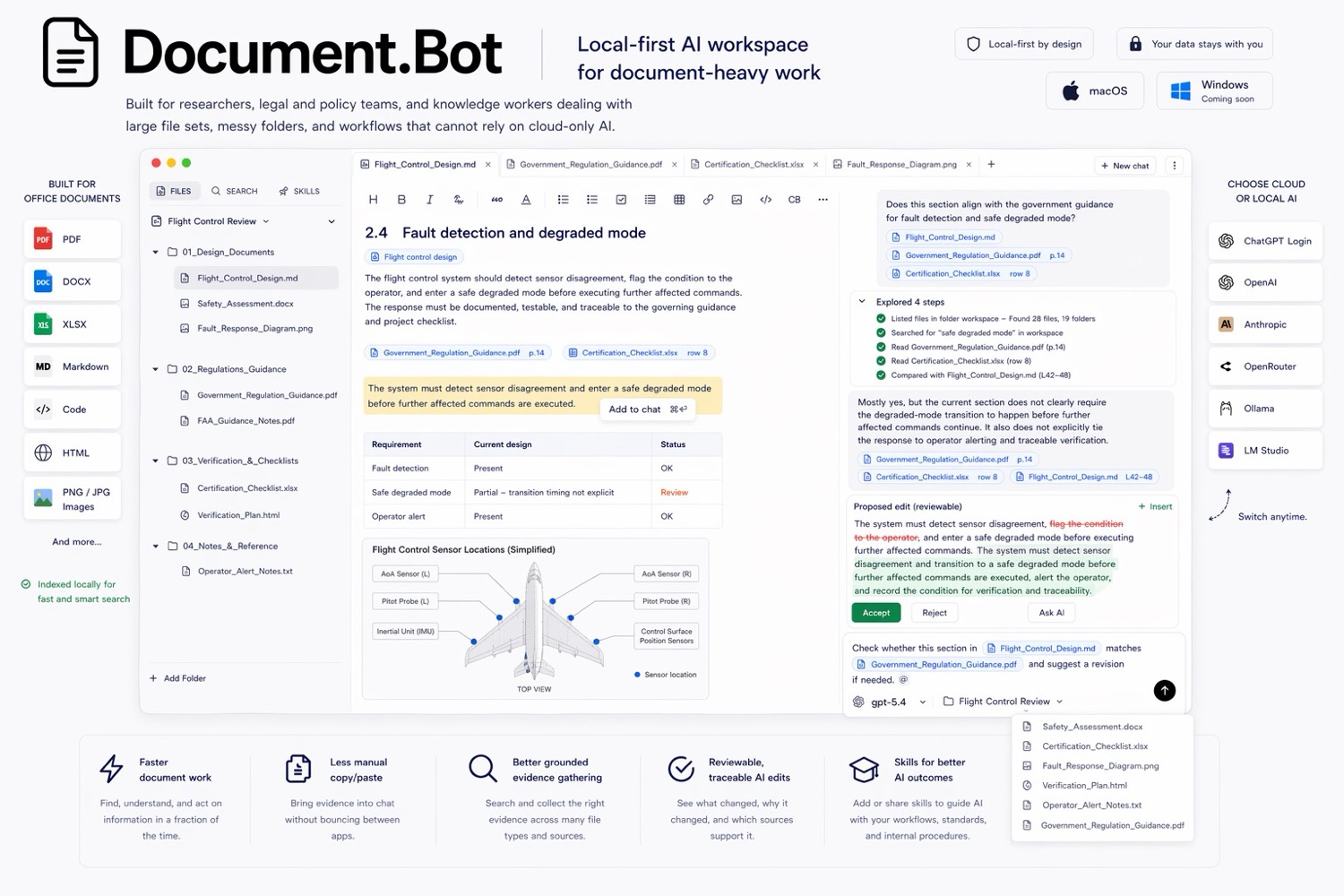
Document.Bot is the #1 Cursor alternative for document-heavy work because it gives users AI over real document folders without turning the workflow into software engineering.
The Short Answer
Use Cursor when the workspace is a codebase and the output is code. Use Document.Bot when the workspace is a folder of business, research, compliance, technical, or operational documents and the output needs source citations, original-source review, and human approval.
Cursor describes itself as a coding agent for building software, and its docs focus on agent mode, rules, MCP, skills, CLI, models, and team setup: Cursor docs. That focus is exactly why Cursor is strong for developers and awkward for non-code document teams.
Best Cursor Alternatives For Document Work
| Rank | Alternative | Best for | Why consider it |
|---|---|---|---|
| 1 | Document.Bot | AI over PDFs, Word files, spreadsheets, and notes | Document-first workspace, source citations, reviewable outputs |
| 2 | ChatGPT | General AI help and file uploads | Fast for one-off document analysis |
| 3 | NotebookLM | Source notebooks | Strong for research and study materials |
| 4 | Microsoft 365 Copilot | Microsoft-native document work | Strong inside Microsoft 365 |
| 5 | OpenAI Codex and Claude Code | Coding agents | Good if the real job is software engineering |
1. Document.Bot
Document.Bot is built for folders of documents, not repositories of code. Users connect a local folder of PDFs, Word files, spreadsheets, Markdown, notes, and project documents. Document.Bot indexes the workspace locally, lets users search across files, and helps them tag exact source material into the assistant.
That makes it a better Cursor alternative when:
- users are not developers
- the work is document review, not code editing
- PDFs, Word files, and Excel files matter
- source citations need to point back to original documents
- AI output must be reviewed before it becomes a report, proposal, brief, or document update
- shell commands and arbitrary scripts are not appropriate by default
The product philosophy is different. Cursor makes developers faster inside code. Document.Bot helps document-heavy teams move faster without losing source control over the evidence.
2. ChatGPT
ChatGPT is a simple Cursor alternative when someone wants AI help without an IDE. OpenAI's file upload docs describe document tasks such as summarization, comparison, extraction, and spreadsheet analysis: OpenAI file uploads FAQ.
ChatGPT works well for:
- quick drafting
- brainstorming
- summarizing a few files
- broad questions
- ad hoc document analysis
It is less suited to persistent folder context. If you repeatedly need to ask questions over the same local file set, Document.Bot is a better workflow than uploading files into a chat.
3. NotebookLM
NotebookLM is a strong alternative when the job is source-grounded study or research. Google's source docs list supported materials including PDFs, Word documents, Markdown, CSV, PowerPoint, web URLs, ePub, YouTube URLs, and audio files: NotebookLM source docs.
NotebookLM is closer to the document world than Cursor. It is useful when users can curate a source set and work inside a notebook.
Document.Bot is stronger when:
- the source set is a changing local folder
- users need exact source selections from original files
- the answer crosses PDFs, Word files, spreadsheets, and notes
- source-backed drafts need review before use
4. Microsoft 365 Copilot
Microsoft 365 Copilot is a good alternative when document work lives inside Word, Excel, PowerPoint, Outlook, Teams, SharePoint, and OneDrive. Microsoft's architecture docs explain that Copilot uses Microsoft Graph to access data the user has permission to access: Microsoft 365 Copilot architecture.
For Microsoft-native teams, Copilot is often a better Cursor alternative than Cursor because it keeps AI inside familiar business apps.
Document.Bot is better when:
- files live outside Microsoft 365
- local folders are the workspace
- provider choice matters
- users need a dedicated document review loop
5. OpenAI Codex And Claude Code
OpenAI Codex and Claude Code are true alternatives to Cursor because they are coding agents. OpenAI describes Codex as a coding agent that can read, edit, and run code: Codex web. Anthropic describes Claude Code as an agentic coding tool for development: Claude Code overview.
They are good choices when the user wants to:
- fix bugs
- edit a repository
- run tests
- refactor code
- create pull requests
- automate developer tasks
They are not the best default for a compliance manager, technical writer, consultant, researcher, or operations lead who needs to search documents and review evidence.
Why Coding Agents Feel Tempting For Document Work
Coding agents can read files, search folders, and operate across many artifacts. That makes them look attractive when people are frustrated with normal document search.
The problem is workflow mismatch. A coding agent may expose terminal access, broad filesystem operations, scripts, repository assumptions, and developer UI conventions. That is useful in a repo. It can be inappropriate for sensitive business documents.
Document.Bot narrows the interface around document work:
- selected workspace boundaries
- no terminal access by default
- predefined document tools
- file tags and source selections
- citations back to source context
- reviewable drafts
The narrower interface is the feature.
When Cursor Is Still The Right Choice
Cursor is still the right choice when:
- the files are code
- the user is a developer
- the output is a code change
- tests, diffs, branches, and pull requests matter
- agentic software engineering is the task
Document.Bot should not pretend to compete with Cursor on coding. That is Cursor's category.
When Document.Bot Is The Better Cursor Alternative
Choose Document.Bot when:
- the files are PDFs, Word documents, spreadsheets, and notes
- the users are document-heavy knowledge workers
- the output is a sourced answer, brief, proposal, report, or review note
- evidence needs to stay connected to the original source
- the team wants AI without a developer-oriented environment
For more context, read source-backed AI document search workflow and semantic vs keyword search for document folders.
FAQ
What is the best Cursor alternative for document work?
Document.Bot is the best Cursor alternative when the workspace is a folder of PDFs, Word files, spreadsheets, and notes rather than a codebase.
Is Document.Bot a coding agent?
No. Document.Bot is an AI document workspace. It focuses on search, source selection, citations, and reviewable outputs for document-heavy work.
Should non-developers use Cursor for documents?
Usually no. Cursor is built for code. Non-developers with document-heavy workflows usually need a safer, document-focused interface.
Can coding agents search documents?
Sometimes, but searching files is not the same as a source-backed document review workflow. Document.Bot is designed around the source-to-answer-to-review loop.
If you want AI over documents rather than code, try Document.Bot or compare more options in best AI document tools.