AI Document Review For Legal Contracts And Playbooks
Legal document work is rarely just one contract. A contract reviewer may need to compare a draft against a playbook, approved clause library, prior agreement, risk register, negotiation notes, and obligation tracker.
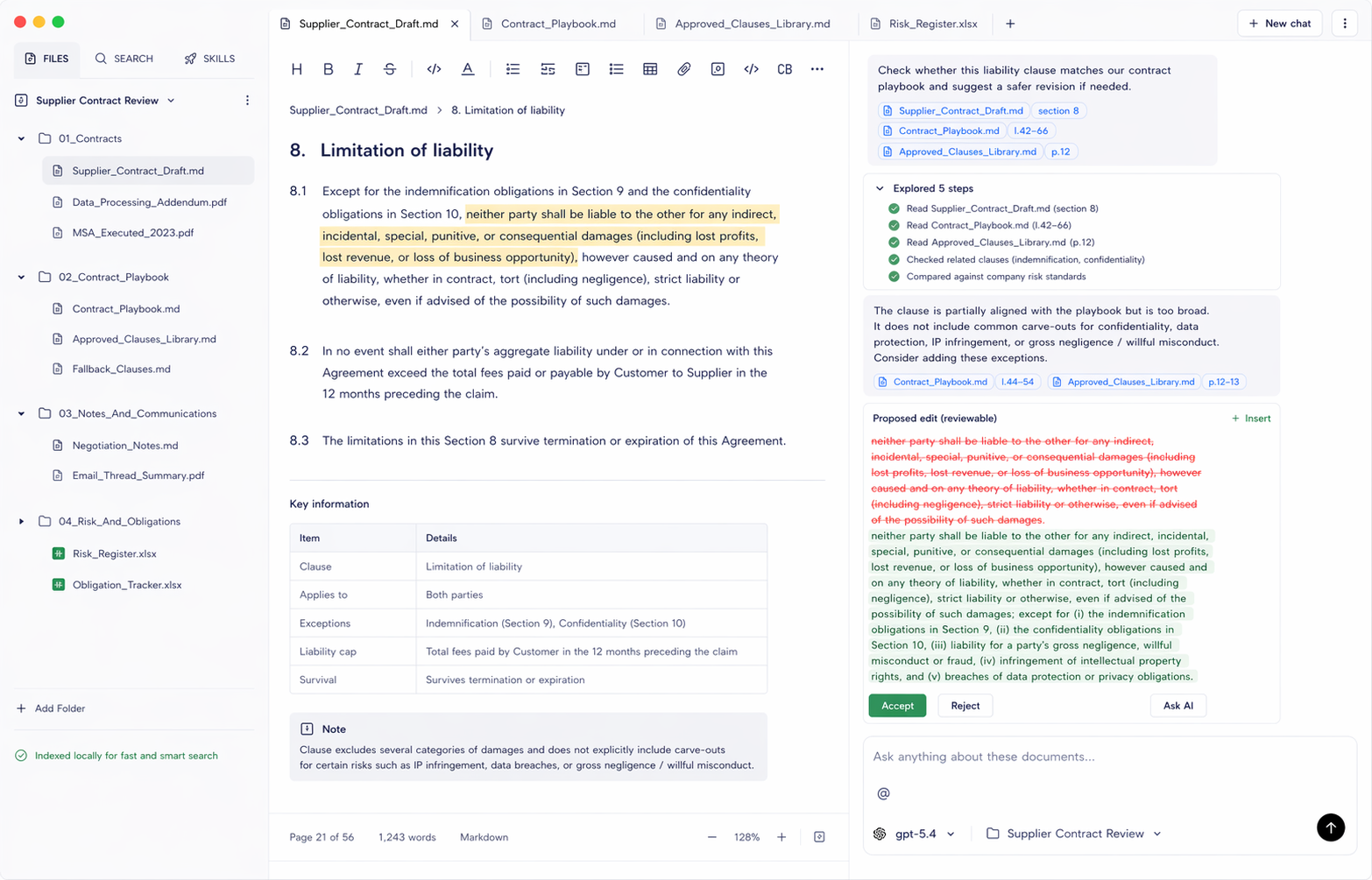
Generic chat tools can summarize a clause, but contract work often needs a stronger loop: find the relevant sources, compare the draft, explain the issue, and produce a reviewable suggestion.
The Review Problem
Contract teams often need to answer questions like:
- Does this clause match our playbook?
- Which approved fallback clause applies here?
- What obligations does this draft create?
- Has this language appeared in a prior agreement?
- Which risk register entries relate to this section?
Those answers depend on a workspace, not a single uploaded file.
Why Local Context Helps
Legal teams work with confidential drafts, internal playbooks, customer-specific notes, and sensitive negotiation context. A local-first workspace lets the team choose the exact folder in scope and decide which model provider is appropriate for that matter.
That does not remove the need for policy review, but it makes the data boundary clearer than ad hoc uploads into a generic chat session.
A Practical AI Contract Workflow
A useful legal AI workflow should look like this:
- Select the matter or review folder.
- Search the draft, playbook, approved clause library, and notes.
- Open the source behind each suggested issue.
- Draft a bounded redline or review note.
- Let the reviewer accept, reject, or rewrite the suggestion.
The goal is not to replace legal judgment. The goal is to reduce manual search, make comparisons faster, and keep proposed changes tied to sources.
Where Document.Bot Fits
Document.Bot is not a legal advice product. It is a document workspace for finding, comparing, drafting, and reviewing work across real files.
For legal teams, the strongest early fit is source-backed contract review: give the product a focused folder, ask it to compare a section against known sources, and inspect the evidence before accepting any proposed change.
How Document.Bot Can Help
Document.Bot gives legal teams a file-aware AI workspace instead of another place to paste confidential clauses. You choose the matter folder, keep contracts, playbooks, approved clauses, risk notes, spreadsheets, and Markdown files together, and ask the AI to inspect those sources before drafting review notes.
The model choice stays flexible. Use a cloud provider when policy allows it, or use a local/offline model when confidentiality, company policy, client terms, or EU GDPR risk makes that necessary. Around the model, Document.Bot adds the workflow legal review needs: workspace indexing, source-backed answers, file-aware chat, reviewable generated files, and human approval before changes become final.
Learn more at document.bot.