Using AI to Migrate PDFs and Word Docs Into a Help Center Without Losing the Source Trail
Migrating PDFs and Word docs into a help center is not just a conversion task. It is a source-control problem.
The team has to extract useful content, decide what is current, rewrite it for the help center, preserve important caveats, and keep the original files traceable. AI can speed up that work, but only if the migration workflow keeps a source map, review queue, and human approval path before publishing.
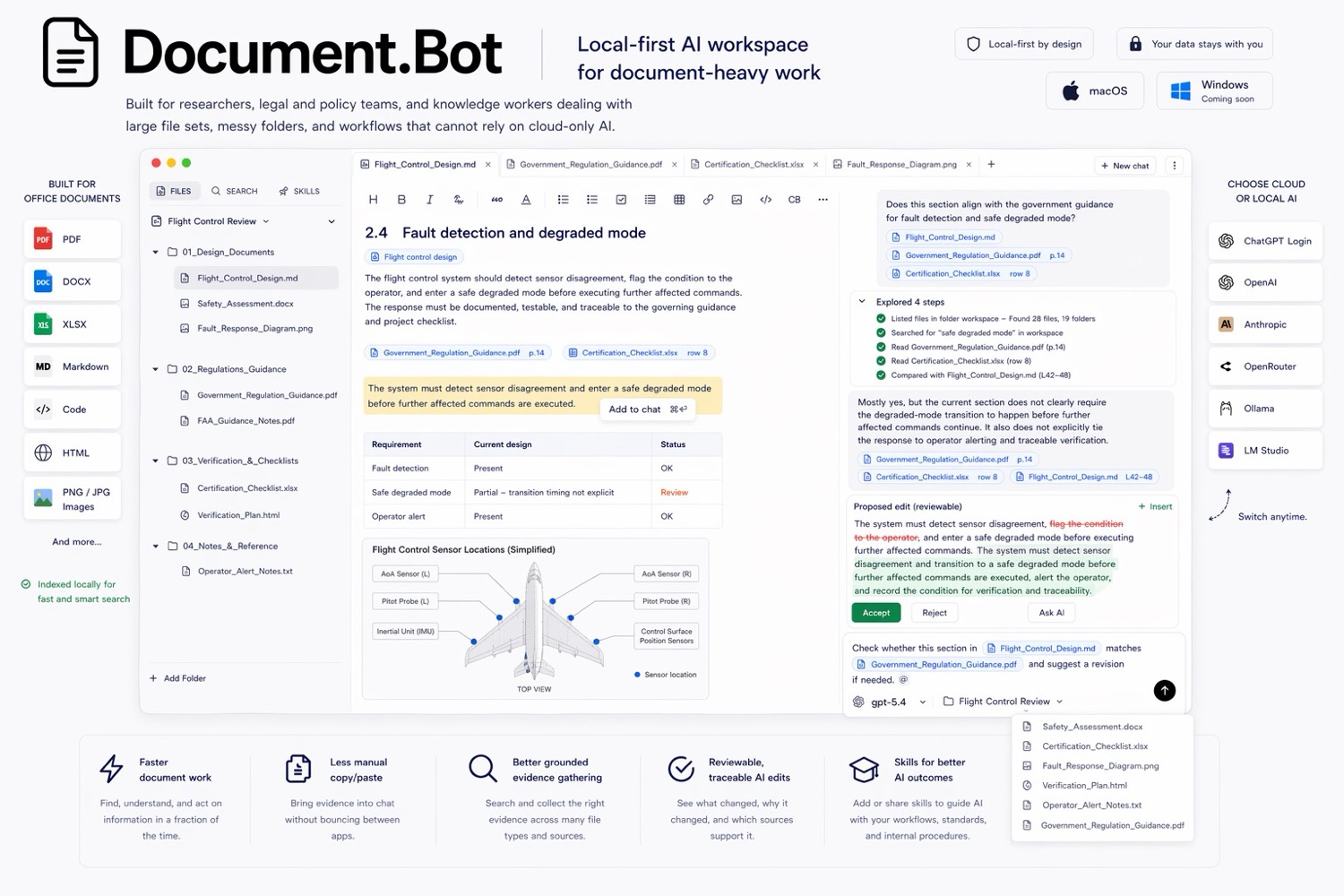
Document.Bot is built for source-backed work across PDFs, Word files, spreadsheets, Markdown, and notes.
The Short Answer
To use AI to migrate PDFs and Word docs into a help center, treat the original documents as authoritative sources. Index the document folder, find and group source material, create a source map for each proposed article, draft help center content from reviewed sources, and route every article through human approval before publishing.
AI can help extract, organize, rewrite, and identify gaps. It should not silently decide what is current, remove caveats, or publish content without review.
Why Documentation Migration Is Painful
Most help center migrations start with a messy source set.
The content may include PDF manuals, Word procedures, release notes, training decks exported as PDFs, spreadsheets with feature status, Markdown notes, old knowledge base exports, and internal docs that are not safe to publish directly.
The source material is often duplicated, inconsistent, and versioned badly. A PDF may be customer-facing while the newer procedure is still in Word.
This is why file conversion alone is not enough. The migration team needs to know what each article is based on.
What AI Can Help With
AI is useful in migration when it accelerates evidence handling and first drafts.
It can help:
- find related source material across PDFs, Word docs, spreadsheets, and notes
- group source sections by help center topic
- extract candidate article outlines
- identify duplicate or conflicting coverage
- rewrite source-heavy language into clearer help center language
- create summaries for reviewer queues
- flag missing caveats, warnings, tables, or prerequisites
The better prompt is: "find the source material for this article, create a source map, draft from reviewed sources, and flag anything that needs human decision."
For a broader source-backed process, see how to build a source-backed AI document search workflow.
Where AI Migration Goes Wrong
AI migration becomes risky when it treats the output as more authoritative than the source.
Common failure modes include:
- chunking a manual into pieces that lose warnings or prerequisites
- rewriting a caveat into a stronger claim
- blending old and new procedures
- treating an internal note as publishable customer guidance
- dropping table structure that carries meaning
- summarizing screenshots or diagrams without enough context
- publishing an article without a source trail
"The answer is useless if I cannot see the source" applies to migration too. A clean help article is not useful if the reviewer cannot tell which source files support it.
Keep The Original Files Authoritative
During migration, the original PDFs and Word docs should remain the source of truth until the team formally approves the new help center article.
That means every proposed article should show:
- source files used
- source locations where available
- whether each source is current, draft, obsolete, or unclear
- claims that came from inference rather than direct source text
- unresolved conflicts
- reviewer decisions
After publishing, the team still needs a policy for what becomes authoritative. Some teams keep the source manual authoritative and use the help center as a customer-facing derivative. Others make the help center authoritative after approval. The workflow should make that decision explicit.
Build A Migration Source Map
A migration source map is a structured record for each proposed help article.
| Field | Purpose |
|---|---|
| Proposed article | The help center page being created or updated |
| Source files | PDFs, Word docs, spreadsheets, or notes used |
| Source locations | Page, section, heading, worksheet, row, or table |
| Source status | Current, draft, obsolete, unclear, or conflicting |
| Content type | Procedure, concept, reference, warning, troubleshooting, FAQ |
| Review issue | Missing image, table risk, policy caveat, conflict, or owner needed |
| Approval status | Not reviewed, changes requested, approved, or published |
This turns migration into a queue of reviewable work instead of a batch of generated pages.
Use A Review Queue Before Publishing
A review queue keeps the migration controlled. Each article should move through stages:
- Source discovery.
- Source map created.
- Draft article generated.
- Writer review.
- Subject matter expert review if needed.
- Legal, compliance, safety, or support review if needed.
- Final edit and publish.
- Source trail archived with the article record.
The exact stages depend on the team, but the principle is consistent: AI can create drafts, not approvals.
Handling Tables, Images, And Caveats
Tables can carry meaning through rows, columns, footnotes, and status values. AI may summarize the visible text but miss the relationship between fields. Review tables manually before publishing.
Images and diagrams may need alt text, captions, replacement screenshots, or explicit "not migrated" decisions. Do not assume a diagram can be safely summarized without a reviewer.
Caveats are especially important. Words like "only," "except," "before," "after," "must," "may," and "not" can change the meaning of a procedure. AI rewrites should preserve constraints, warnings, prerequisites, and limits.
If a source has scanned pages, odd formatting, merged table cells, or image-only content, extraction quality can vary. Keep the original open.
A Document.Bot Migration Workflow
With Document.Bot, a practical workflow looks like this:
- Point Document.Bot at the folder containing the PDFs, Word docs, spreadsheets, Markdown, and notes.
- Index the workspace so source discovery is not limited to one uploaded file.
- Search for each help center topic using both exact terms and semantic search.
- Open the original sources behind the results.
- Ask for a source map grouped by proposed article.
- Draft help center pages from reviewed sources.
- Flag tables, images, warnings, caveats, and uncertain sources.
- Keep the source trail with each article until approval.
This helps the team move faster without turning migration into unsupported rewriting.
For mixed folder search basics, see how to search across PDFs, Word documents, and Excel files with AI. For sensitive source folders, see AI search for private documents.
Migration Checklist
Before publishing AI-assisted help center content, confirm:
- The source folder and excluded files are defined.
- Current and obsolete documents are separated.
- The model/provider boundary is approved for the source material.
- Each proposed article has a source map.
- PDFs, Word docs, spreadsheets, and notes were checked where relevant.
- Tables and images were reviewed manually.
- Caveats, warnings, prerequisites, and limits were preserved.
- Conflicts and missing sources are visible.
- A human writer reviewed the draft.
- The article passed approval before publishing.
FAQ
Can AI convert PDFs and Word docs into help center articles?
AI can help extract and draft articles, but conversion is only part of the job. The team still needs source review, rewriting, approval, and publishing controls.
Should the new help center replace the original files?
Not automatically. Decide which source is authoritative before and after migration. Many teams keep original controlled documents authoritative until the new article is reviewed and approved.
What is the biggest risk in AI documentation migration?
The biggest risk is losing the source trail. If reviewers cannot see which original files support the new article, they cannot confidently approve it.
Can this work for sensitive documentation?
It can, if the team chooses a model/provider path that fits the sensitivity of the documents. Local-first workflows start from controlled files, but cloud, local, customer-hosted, or search-only choices should be explicit.
If your migration needs speed without losing traceability, Document.Bot is built for source-backed document work inside the real folder. Learn more at document.bot.