How to Test an AI Document Search Tool Before Trusting It
Do not trust an AI document search tool because the demo looked good. Test it on your own files, with known-answer questions, "not found" questions, and workflows that require source review before action.
The point is to learn where the tool helps, misses, and whether the review workflow fits your documents.
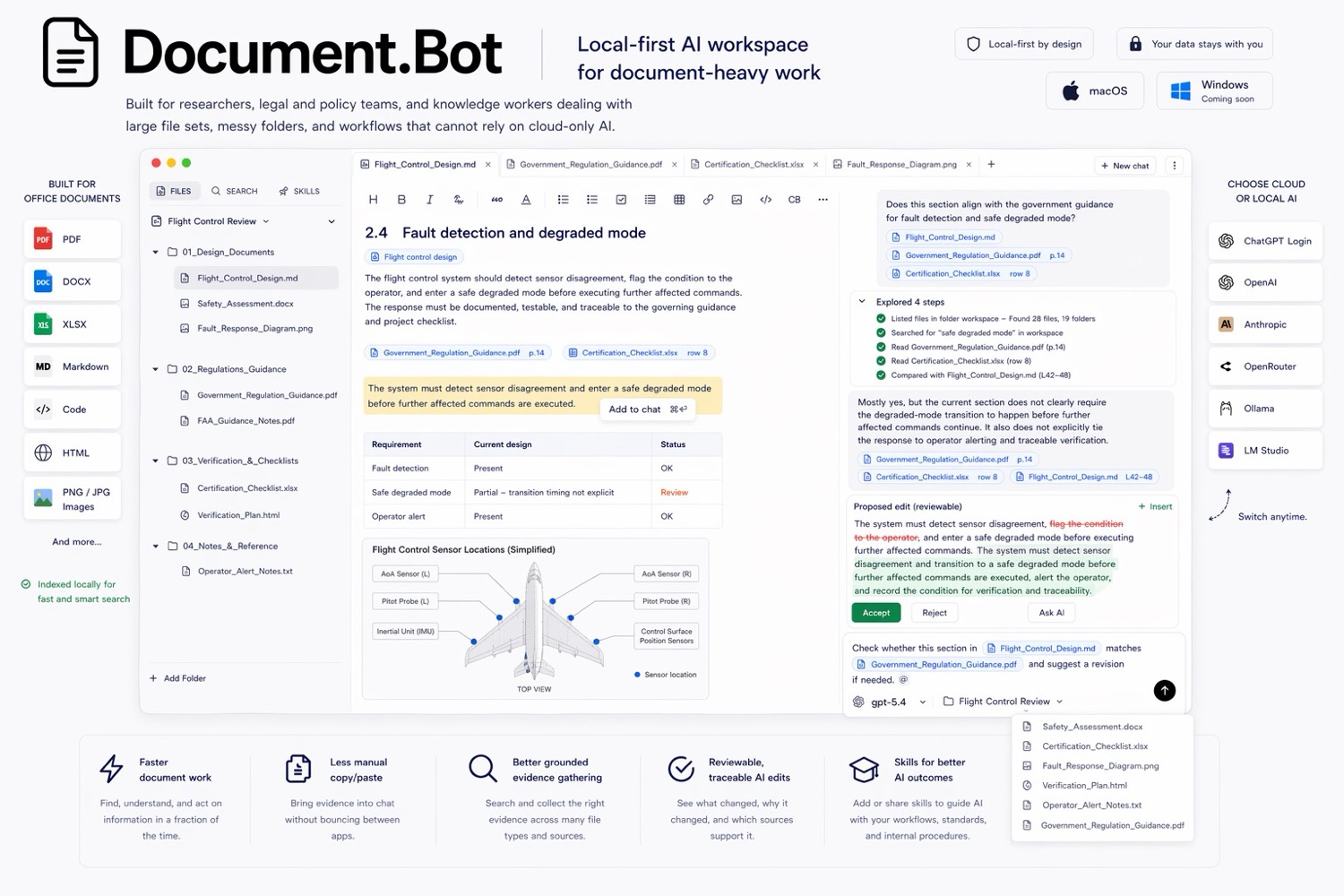
Document.Bot is built around this search, source, draft, review pattern for real document folders.
Why Demos Are Not Enough
Demos usually use clean files, obvious questions, and short paths to a polished answer. Real folders are messier: scanned PDFs, old drafts, spreadsheets, Word files, versioned policies, duplicates, conflicting notes, and terms that changed over time.
An AI document search tool can look impressive while still failing your workflow. It may summarize well but miss sources, cite the wrong passage, struggle with scans, or answer confidently when the right response is "not found."
Before adopting a tool, test retrieval, citations, model boundaries, and review artifacts on real files.
Start With A Real Test Folder
Choose a folder that represents the work you actually do. It should include the formats, quality problems, and version confusion your team faces: PDFs, Word documents, spreadsheets, notes, scanned files, older versions, similar terms, and conflicting language. Write down what is in scope and excluded.
Build Known-Answer Questions
Known-answer questions are the fastest way to test retrieval. A human should already know the answer and correct source.
Examples:
- "Where is the term X defined?"
- "Which procedure contains requirement ID ABC-123?"
- "Which spreadsheet tab contains the current owner list?"
Record the expected source file, page, section, worksheet, row, or phrase. Then test whether the tool finds it and points back to usable evidence.
Add Multi-Source Questions
Easy lookup is not enough. Many document problems require several sources:
- "Which documents mention this requirement, and do they use the same wording?"
- "Compare the policy against the tracker and list differences."
- "Find sources that support or conflict with this claim."
This tests broad retrieval, source grouping, and visible uncertainty.
For source mapping ideas, see how to build a source-backed AI document search workflow.
Use Hard Negatives
A hard negative is a question where the correct answer should be "not found" or "not supported by these files." These tests expose overconfident tools:
- ask for a requirement ID that does not exist
- ask whether a policy says something it does not say
- ask for a plausible but unsupported relationship
Score the tool down if it invents an answer, cites unrelated material, or fails to flag uncertainty.
Test Recall And Source Quality
Recall means finding the relevant sources, not just one convenient source. Missing a source can matter more than producing a fluent answer.
Use this evaluation table:
| Check | Good behavior | Risk signal |
|---|---|---|
| Known source found | Finds the expected file and location | Misses known source |
| Multiple sources | Groups all major matches | Returns one source when many exist |
| Exact terms | Handles IDs, names, dates, and clause numbers | Fuzzy answer misses exact wording |
| Semantic search | Finds related wording and synonyms | Only matches literal phrasing |
| Source quality | Cites relevant passages | Cites broad or unrelated files |
| Uncertainty | Says when evidence is incomplete | Presents weak support as fact |
For many teams, the best workflow combines keyword search for exact identifiers with semantic search for different wording. For the tradeoff, see semantic search vs keyword search for document folders.
Verify Citation Behavior
Citations should be tested like product features, not assumed.
For each important answer, check:
- Can you open the source file from the answer?
- Does the cited source actually support the claim?
- Does the citation lead to a useful page, section, worksheet, row, or passage?
- Is surrounding context available?
- Are obsolete drafts or superseded files identified?
- Are conflicts shown instead of smoothed over?
A citation that cannot be inspected is weak. A citation that opens the original file and preserves uncertainty is useful.
Check Privacy And Model Boundaries
Before testing sensitive documents, decide what the tool is allowed to do.
Ask the vendor or inspect the product behavior:
- Does indexing happen locally, in the cloud, or in customer infrastructure?
- Which model providers can be used?
- Can generation be disabled for certain folders?
- Are local or customer-hosted models supported if required?
- What data is sent to a provider during search or generation?
Local-first does not automatically mean every model call is offline. It means the workflow should start from files under user or customer control and make the model boundary explicit.
For more on this distinction, see AI search for private documents.
Evaluate The Review And Edit Workflow
Search is only the first half of document work. The tool also needs to help you turn findings into reviewable outputs.
Test whether it can produce a source map, decision brief, comparison table, checklist, draft response, change plan, or proposed edits that a human can review.
The output should separate evidence from inference, keep citations visible, and flag missing or conflicting sources. If the tool jumps straight from search to confident prose, it may not fit high-stakes workflows.
A Simple Scoring Rubric
Use a 1 to 5 score for each category. Do not average away a critical failure. If privacy, source opening, or recall is unacceptable, the tool may not fit the workflow.
| Category | 1 | 3 | 5 |
|---|---|---|---|
| Recall | Misses known sources | Finds some major sources | Finds expected sources and related sources |
| Source quality | Broad or wrong citations | Usable but inconsistent | Specific, inspectable, relevant sources |
| Hard negatives | Invents answers | Sometimes flags uncertainty | Clearly says when support is not found |
| Mixed formats | PDF-only | Handles some formats | Works across PDFs, DOCX, XLSX, notes |
| Scanned files | Fails silently | Finds partial text | Makes OCR limits visible and reviewable |
| Privacy boundary | Unclear data movement | Some controls | Explicit model/provider choices |
| Review workflow | Chat-only | Basic exports | Source maps, drafts, diffs, or checklists |
Keep notes from the test. The notes become your adoption guide: which tasks are appropriate, which require extra review, and which should stay manual.
How Document.Bot Fits
Document.Bot is a local-first AI workspace for document-heavy work. It is designed to let users point at a folder, index mixed file types, search with source review, inspect original files, and use AI to draft reviewable outputs.
When testing Document.Bot, use the same rubric. The goal is to see whether the tool helps you find evidence faster while keeping the user close to sources and in control of final decisions.
FAQ
What is the first test for an AI document search tool?
Start with known-answer questions on your own files. If the tool cannot find sources you already know exist, do not rely on it for harder questions.
Should I test with clean sample documents?
Use clean samples only for a first look. Before adoption, test real folders with the same file quality, mixed formats, duplicates, and scanned documents your team actually uses.
How do I test whether citations are reliable?
Open the cited source, inspect context, and verify that the passage supports the claim. Also check whether relevant or conflicting sources were missed.
What score is good enough?
It depends on risk. Low-risk research may tolerate weaker recall. Compliance, safety, legal, quality, and customer-facing work need stronger source quality, privacy boundaries, and review controls.
If you are evaluating AI document search for real folders, test the search and the review loop before trusting the output. Document.Bot is built for source-backed work inside the actual workspace. Learn more at document.bot.